Ahsan Javaid
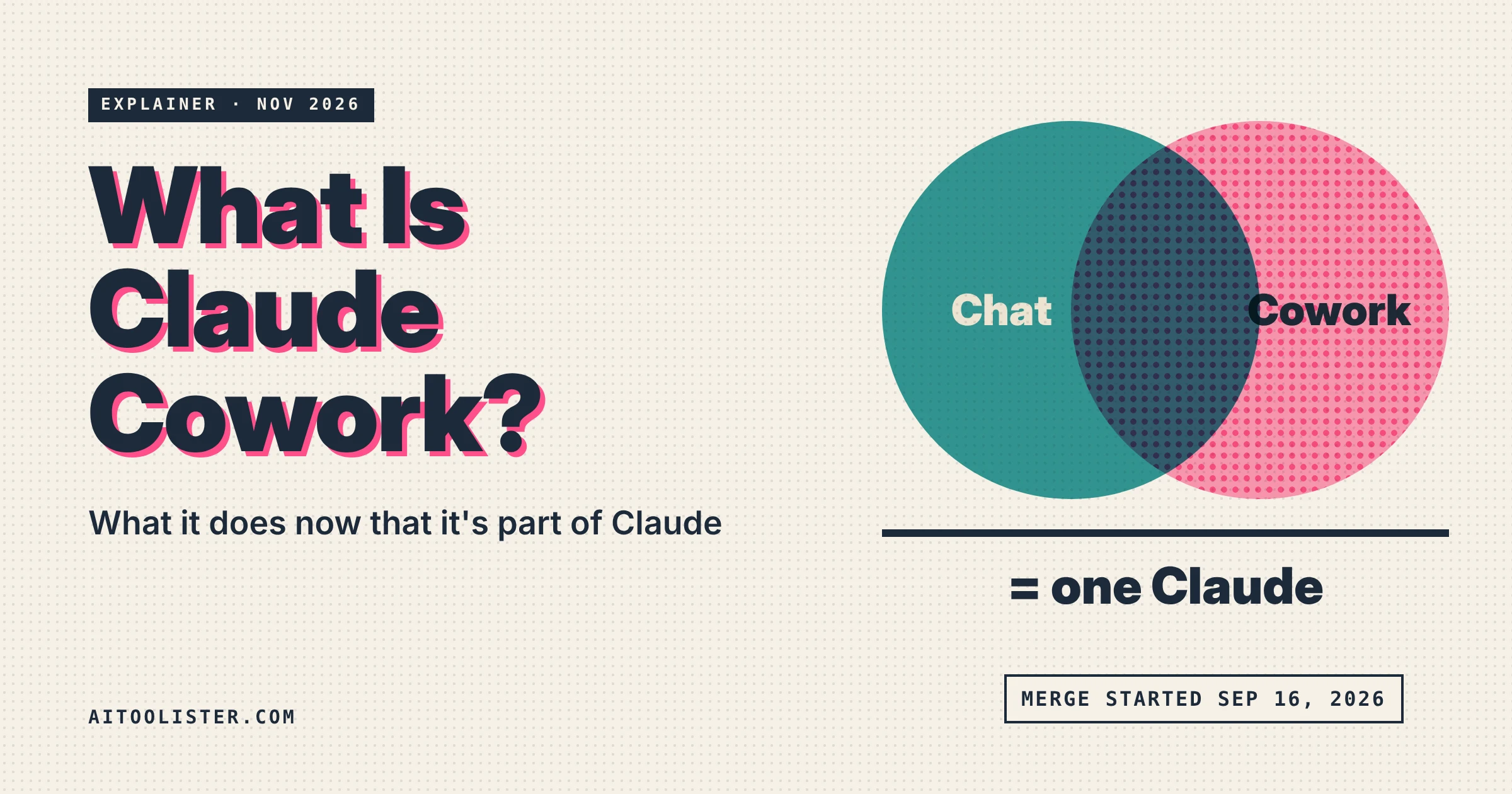
Claude Cowork is Anthropic’s way of handing Claude a whole task instead of a single question. You describe the result you want, and Claude plans the steps, works across the folders, apps and websites you give it access to, and hands back finished work such as a spreadsheet, a report or a slide deck. On September 16, 2026, Anthropic folded Cowork into Claude itself, so it is no longer a separate product. It hasn’t been discontinued, but depending on your account, your screen may look different from older tutorials.
How we checked: this guide is based on Anthropic’s official product pages, pricing page, release notes and Help Center articles, all reviewed on November 9, 2026, including every price below. No hands-on testing claims are made.
What is Claude Cowork and what can it do?
In an ordinary chat, you ask a question, and Claude answers it. Cowork is built for agentic work, where Claude takes a goal, breaks it into steps and carries them out one after another, showing each step as it goes so you can redirect or stop it. If you’re new to the idea, our guide to how AI agents work explains the concept in plain terms.
According to Anthropic, Cowork can work with:
- Folders you connect on your computer, reading and writing files inside them
- Connectors to apps and services you already use
- The web, through a built-in browser or the Claude in Chrome extension
- Scheduled tasks that run on a daily, weekly or monthly schedule, or on demand
- Projects, which group related tasks with their own files, instructions and memory
- Sub-agents, which split a large job into parallel pieces
What comes out the other end is usually a usable file. Anthropic’s Get started guide lists Excel spreadsheets with working formulas, slide decks and formatted documents.
Not every ability works everywhere. Some depend on your plan or device: computer use, for example, is a beta for Pro, Max and Ultra only, and anything involving files on your computer needs the Claude desktop app. The “How does Claude Cowork work now?” section below explains which is which.
Two examples, step by step
Organizing a messy folder. You tell Claude, “Sort my Downloads folder by type and rename the files so they’re easy to find.” You connect that folder in the Claude desktop app. Claude looks through the files, proposes a folder structure, then moves and renames files to match it. Anthropic’s Get Started guide says Claude requires your explicit permission before permanently deleting files, which gives you a checkpoint before anything disappears, though it’s still worth reviewing what it proposes. You finish by checking the new structure.
Turning receipts into an expense sheet. You point Claude at a folder of receipt PDFs and photos and ask for a monthly expense spreadsheet. Claude reads each receipt, pulls out the date, vendor and amount, and builds a spreadsheet with working totals. A good prompt also asks it to flag any receipt it couldn’t read clearly. You then check the totals against your records before using the sheet.
Two shorter examples:
- A weekly summary: a scheduled task that researches named competitors every Monday and writes a one-page update.
- A deck from notes: meeting notes in, a first-draft slide deck out, ready for you to edit.
What happened to Claude Cowork?
Claude Cowork wasn’t shut down. It was merged into the main Claude app, so you no longer have to open a separate place to use it. Several articles and videos describe it as “gone” or “dead,” but Anthropic’s own product page now says Cowork is part of Claude.
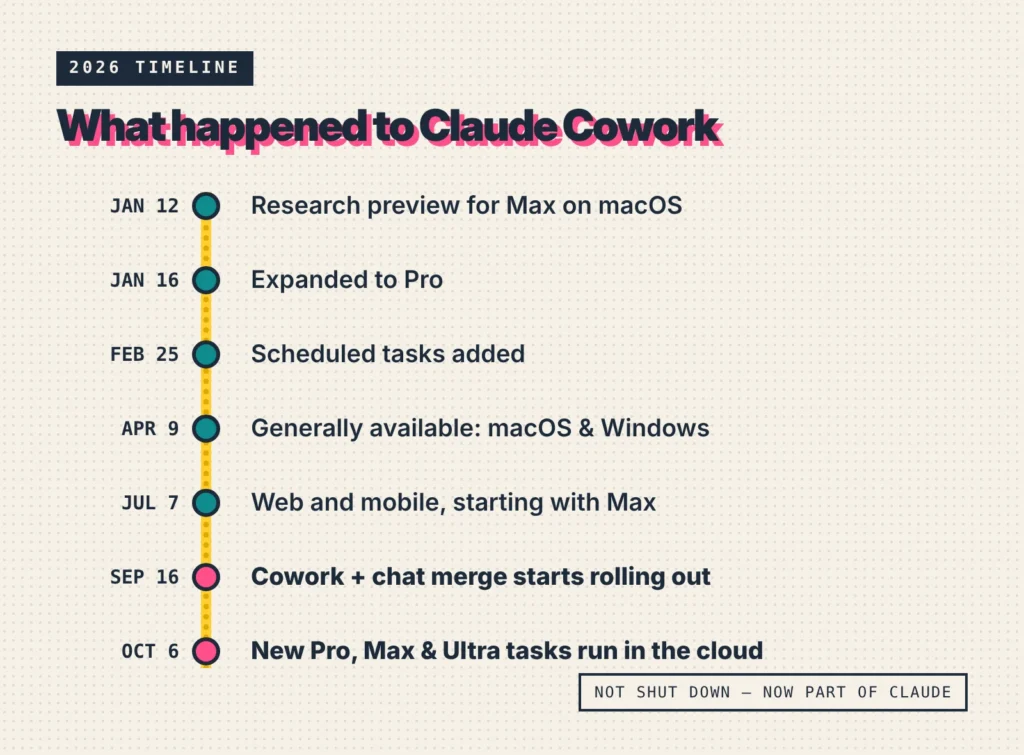
Here’s how it got there, based on Anthropic’s release notes and Help Center:
| Date (2026) | What changed |
|---|---|
| January 12 | Research preview launched for Max subscribers on macOS |
| January 16 | Preview expanded to Pro subscribers |
| February 25 | Recurring and on-demand scheduled tasks added |
| April 9 | Generally available on macOS and Windows |
| July 7 | Expanded to web and mobile, starting with Max |
| September 16 | Cowork and chat start merging into one Claude |
| October 6 | New Cowork tasks on Pro, Max and Ultra run in the cloud |
The merge is a gradual rollout
The September 16 change didn’t switch everyone over at once. According to Anthropic’s Help Center article on the merge, the new experience is rolling out gradually to Pro, Max and Ultra, is in beta for Team, and is available on Enterprise where an admin turns it on. Two accounts on the same plan can get it at different times.
That explains why people see different screens. If your message box still shows separate Chat and Cowork options, you haven’t been moved yet. Once your account switches, those options disappear and you can’t switch back. Your chats, Cowork tasks, projects, connectors, skills and files carry over either way.
What changed on October 6, and what didn’t
According to Anthropic’s Help Center article on using Cowork on web, desktop and mobile, from October 6, 2026, new Cowork tasks on Pro, Max and Ultra plans began running in the cloud on Anthropic’s servers, and the “Only on your computer” setting was removed. This change doesn’t mean Cowork stopped working with your computer:
- Your folders stay on your computer, and Claude can still use the ones you connect through the desktop app.
- For cloud tasks, Claude fetches a copy of only the files it needs.
- Tasks you started on your computer before October 6 stay local so you can finish them.
- Existing local scheduled tasks keep running locally; new ones run in the cloud.
How does Claude Cowork work now?
Accessing Cowork in the new and old interface
In the new experience, there’s no mode to choose. You ask for what you need in any conversation, and Claude decides when a request needs Cowork-style, multi-step work. In accounts that haven’t switched yet, you select Cowork in the message box before describing your task. Either way, Claude and Claude Cowork are now the same product, so there’s no separate app to pick between.
You can tell when Claude has taken on a Cowork-style task because it works through visible steps, such as searching the web, reading files or running code, and shows each one as it goes. A quick question simply gets a reply.
How to start your first Cowork task
- Open Claude on the web, in the desktop app, or on your phone.
- Describe the outcome, not the steps. “Build a spreadsheet of these invoices with a total per client” works better than a list of instructions.
- Give access if the task needs your files. Connect the relevant folder in the Claude desktop app, and only that folder.
- Review Claude’s plan. Claude shows what it intends to do; redirect it before it starts if something looks wrong.
- Check the result. Open the finished file and verify the details that matter before you send or use it.
Cloud tasks vs your computer
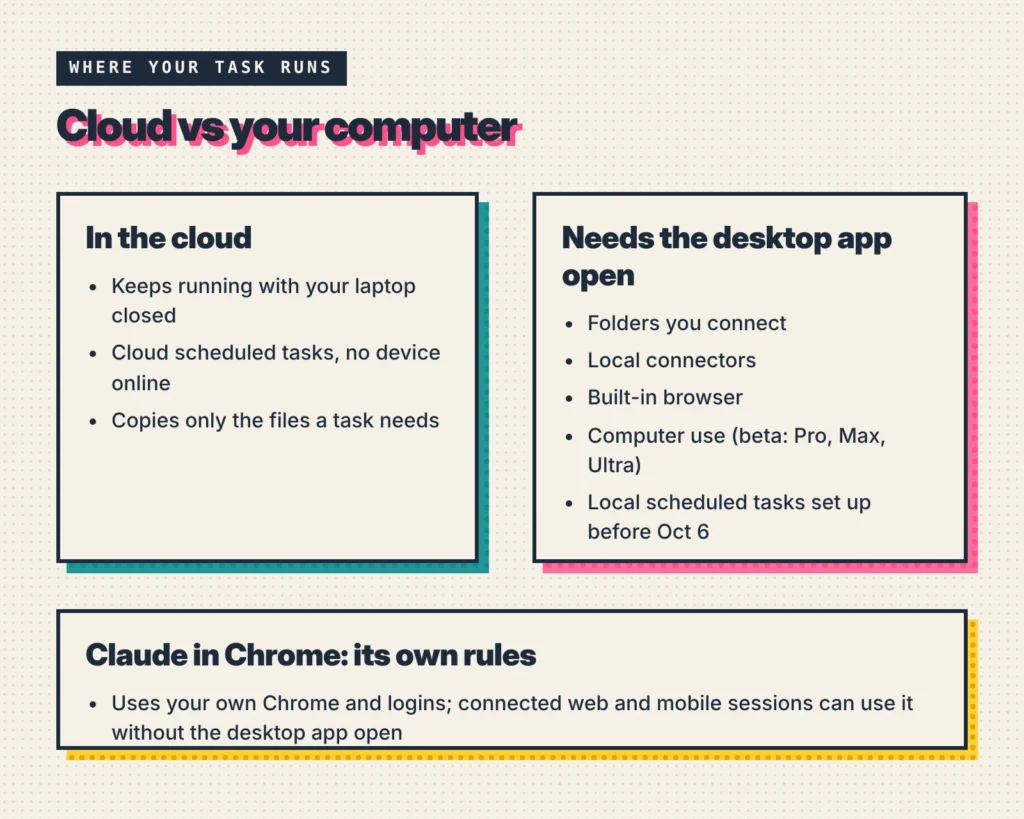
Cloud tasks keep running when you close your laptop, and scheduled tasks that run in the cloud don’t need any device online. Older scheduled tasks set up to run locally before October 6 still run on your computer, so your computer needs to be on. Anything that touches your own machine works differently. Local folders, local connectors, the desktop app’s built-in browser, and computer use all require the Claude desktop app to be open, even when the task runs in the cloud. Web and mobile sessions can reach your files only through the desktop app. The Claude in Chrome extension is the exception: it uses your own Chrome browser, so web and mobile sessions connected to your computer can use it without the desktop app being open.
Browser use, computer use, connectors and local files
These abilities are easy to confuse, but they work differently:
| Ability | What it does | What it needs |
|---|---|---|
| Connectors | Links Claude to apps and services you already use | Setup in Claude; the fastest, most reliable option |
| Browser use (built-in browser) | Opens websites, reads pages, clicks and fills forms in a separate browser inside the desktop app, without your logins | Desktop app open and online |
| Browser use (Claude in Chrome) | Does the same in your own Chrome, with the sites you’re already signed in to | The Claude in Chrome extension installed |
| Computer use | Controls your Mac or Windows desktop by clicking, typing and opening apps | Desktop app open; beta on Pro, Max and Ultra only |
| Local files | Reads and writes files in folders you connect | Desktop app open on your computer |
Anthropic describes computer use as a fallback: Claude tries a connector first, then the browser, and controls your screen only when neither fits.
Permission settings
A permission setting in the message box controls how independently Claude works. According to Anthropic’s Help Center article on the merge, Auto is the default on Pro, Max, Ultra and Team: Claude keeps going without asking about each step, after automated safety checks. Manual, the default on Enterprise, makes Claude ask before each action. You can change the setting at any time and stop or redirect Claude mid-task.
Where you can use it
Cowork works in the Claude desktop app for macOS and Windows (Linux is in beta), on the web, in the iOS and Android apps, and in the Claude in Chrome side panel. Sessions follow your account, so you can start a task on your computer and check on it from your phone.
How much does Claude Cowork cost?
Claude Cowork has no separate fee. It’s included in Claude’s paid plans and isn’t available on the Free plan. These prices come from Anthropic’s pricing page:
| Plan | Price | Cowork included | Usage |
|---|---|---|---|
| Free | $0 | No | Not applicable |
| Pro | $20 a month, or $17 a month billed annually ($200 up front) | Yes | More than Free |
| Max | $100 a month | Yes | 5x Pro |
| Ultra | $200 a month | Yes | 10x Pro’s weekly usage; no 5-hour limit once the account is verified |
| Team Standard | $25 per seat monthly, or $20 per seat billed annually | Yes | More than Pro |
| Team Premium | $125 per seat monthly, or $100 per seat billed annually | Yes | 5x Standard seats |
| Enterprise | $20 per seat a month, billed annually, 20-seat minimum, plus usage at API rates | Yes, where admins enable it | Billed by usage |
So yes, Claude Pro includes Cowork. What changes between plans is how much you can do before hitting limits. Most paid plans have two kinds of limits: a rolling five-hour limit and a weekly limit. Ultra’s “10x” refers to weekly usage. Ultra accounts are verified automatically based on account and payment history, and a temporary limit applies until that happens; after verification, there’s no five-hour limit, but the weekly limit still applies. Multi-step tasks use your allowance faster than simple questions, so heavy Cowork users tend to run into Pro’s limits sooner. Anthropic suggests grouping related work, starting a new conversation for unrelated tasks, and checking your usage in Settings.
Anthropic doesn’t list a free trial for paid plans. Students can’t get Cowork on the Free plan; Anthropic offers a university-wide education plan at discounted rates, but doesn’t publish its price.
Claude Cowork vs Claude Code vs Claude chat
All three use Anthropic’s Claude models, but they have different interfaces, tools and workflows, and the models you can pick can vary by product and plan. In short, Cowork is meant for non-coding work, while Claude Code is built for software development:
| Claude chat | Claude Cowork | Claude Code | |
|---|---|---|---|
| Built for | Questions, explanations, short drafts | Multi-step work on files, documents and apps | Software development |
| Where it works | Claude apps | Claude apps, with your folders and tools | Terminal, code editors, desktop app, web and mobile |
| Typical task | “Explain this contract clause” | “Turn these receipts into an expense sheet” | “Fix this bug and add tests” |
| Skills needed | None | None | Comfort with code and repositories |
| Pick it when | You need an answer | You need finished work handed back | You’re changing a codebase |
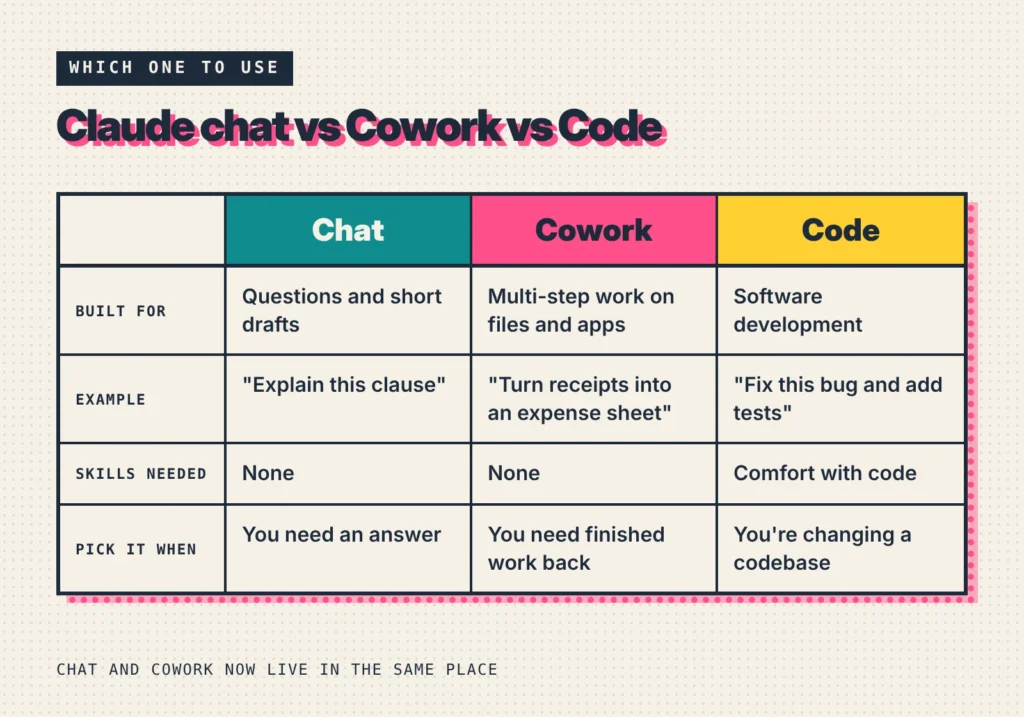
A simple rule of thumb: codebase work goes to Claude Code, file-based office work goes to Cowork, and quick questions go to chat, which now lives in the same place as Cowork.
Is Cowork just Claude Code with a friendlier face?
Partly. Anthropic describes Cowork as bringing Claude Code’s multi-step abilities to non-coding work. The difference is the audience: Cowork doesn’t expect you to use a terminal or understand code, and it’s designed around documents, spreadsheets and everyday apps. Claude Code gives developers more control over projects, testing and tools. If you work in code, our guide to creating and installing Claude Code skills covers how developers extend it.
What are the limitations and security risks of Claude Cowork?
Cowork can act on your behalf, which is what makes it useful and also what makes it worth using carefully. Anthropic has safeguards in place, but safeguards reduce risk; they don’t guarantee nothing goes wrong.
File access and permissions
Anthropic’s Help Center says Claude reaches only the folders you’ve connected, but within those folders it can read, change and create files. Connect only what a task needs, and avoid connecting your whole home folder for a small job.
Prompt injection
Prompt injection is when a web page, email or file contains hidden text that tries to give Claude instructions, such as “send this data somewhere.” Anthropic’s Get started guide for Cowork says Auto mode screens actions for risks like this, and it still advises staying close to tasks with real consequences. Screening reduces the risk; it doesn’t remove it. For anything sensitive, switch to Manual mode.
Cloud processing and your data
Cloud tasks run on Anthropic’s servers. Claude fetches copies of only the files a task needs, and deleting a task deletes those copies too. The same Get started guide says deleted tasks are removed immediately and purged from backend storage within 30 days. None of this makes data automatically safe, so check your organization’s rules before connecting confidential files.
Computer use cautions
When Claude controls your screen, it takes screenshots, so anything visible can be seen. Anthropic’s Help Center article on computer use in Cowork says Claude asks permission before using each app, blocks some sensitive apps such as trading and crypto platforms by default, and advises against using computer use for banking, healthcare, government, legal or financial work.
Reliability and limits
Claude can misread a file or make a wrong assumption, so review important outputs and actions before relying on them. Practical limits also apply: busy plans hit usage limits sooner, and local file access, the built-in browser and computer use stop working if the desktop app is closed. The Claude in Chrome extension has its own requirements, covered earlier.
Who should use Claude Cowork?
Cowork suits people whose work involves files, documents and repeated steps:
- Students and researchers who want sources gathered and summarized into a structured document. Check every source and citation before you rely on it.
- Office workers who build reports, spreadsheets and presentations from scattered material. Spot-check the formulas and totals before sharing.
- Business owners who want recurring admin, such as a weekly summary, handled as a scheduled task. Review scheduled outputs regularly instead of assuming each run went well.
- Developers, mostly for non-coding work. For changes to a codebase, Claude Code is the better fit.
Ordinary chat is enough for a one-off answer, a short email, or a quick explanation. Whether Cowork is worth paying for depends on how much repetitive file work you do each week. If a single task regularly takes you an hour, it’s worth testing on Pro first. For a broader look at Claude’s strengths beyond Cowork, see what Claude AI is good for.
Frequently asked questions about Claude Cowork
Is Claude Cowork free?
Not on its own. Claude has a Free plan you can use without paying, but Cowork’s multi-step task features aren’t included. Cowork is included in the paid plans (Pro, Max, Ultra, Team and Enterprise), and Anthropic doesn’t list a free trial for them.
Is Claude Cowork the same as Claude Pro or Claude Team?
No. Pro and Team are subscription plans, while Cowork is a capability inside Claude. Both Pro and Team include Cowork, along with Max, Ultra and Enterprise.
Why can’t I find Cowork, or is it down?
If your account has moved to the new experience, there’s no Cowork button anymore: you just ask for the task in a normal conversation. If Claude isn’t responding, check Anthropic’s official status page at status.claude.com.
Is Claude Cowork available on Mac and Windows?
Yes. Cowork runs in the Claude desktop app for macOS and Windows, with Linux in beta. It also works on the web, in the iOS and Android apps, and in the Claude in Chrome side panel.
Do I need to download Claude Cowork separately?
No. There’s no separate Cowork download. It’s part of the Claude app, though you’ll need the Claude desktop app if you want Claude to work with files on your computer.
Can Claude Cowork access my local files?
Yes, through the Claude desktop app, and only in folders you connect. For cloud tasks, Claude fetches copies of only the files it needs, and the desktop app must be open for that to work.
Is there an equivalent to Claude Cowork?
Other AI assistants, including ChatGPT, offer their own agent features. What makes a tool comparable to Cowork is the combination: it plans and carries out several steps on its own, works with your files and apps, can browse the web, can run tasks on a schedule, and lets you set how much it may do without asking. Tools differ on which of these they support and on which plans, so compare them on the specific task you want to hand off.
The bottom line
Claude Cowork is still here; it’s simply become part of Claude. If you’re on an eligible paid plan, Cowork is included, though whether you see the merged interface yet depends on your account’s rollout; on Enterprise, it depends on your admin’s settings. Start by handing Claude one repetitive task you do every week, connect only the folder it needs, and check the result before you rely on it.
Keep Exploring