Ahsan Javaid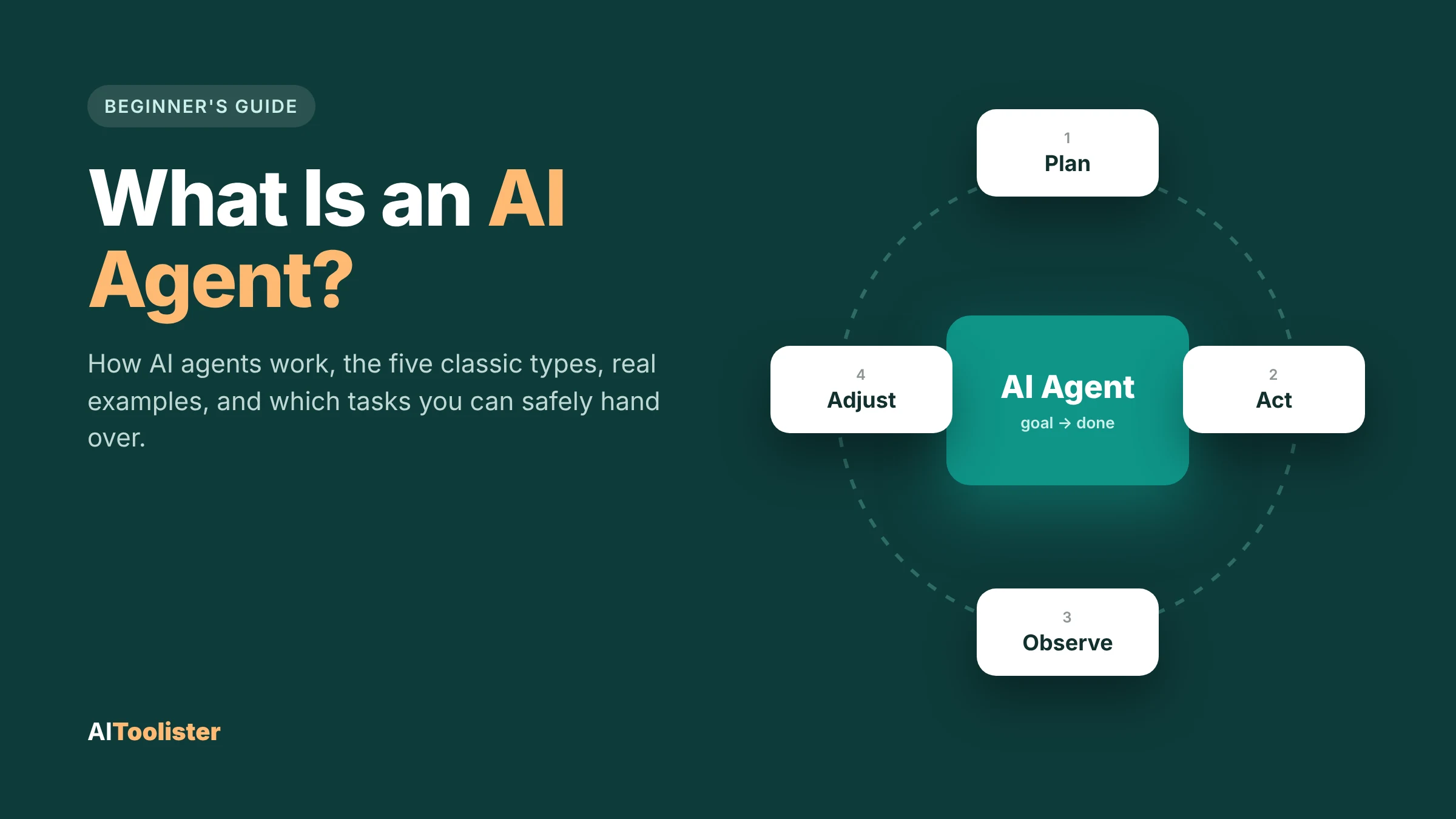
What is an AI agent? It’s software you give a goal to; it works out the steps, uses tools like a web browser, apps, or files to carry them out, and checks its own progress until the job is done. That’s the short answer, and the difference from a normal chatbot comes down to one thing: a chatbot tells you how to book a table, while an agent can book it for you, with your permission.
Below, you’ll see what makes something an agent, follow one through a real task step by step, learn the five classic types, and find out whether ChatGPT, Claude, Gemini and Copilot count. There’s also a simple way to decide which tasks you can safely hand over.
What Is an AI Agent, and What Makes Something One?
Imagine asking two different programs to “sort out my team lunch on Friday.” The first one gives you a nice checklist: pick a place, check dietary needs, book a table. The second checks your calendar, finds nearby restaurants with free tables, asks you to confirm one, and books it. The first is acting as an assistant. The second acts as an agent because it can use your calendar and a booking service with your permission.
What separates them are four traits. Most AI agents have all of them:
- A goal. You describe an outcome (“book lunch for six”), not every step.
- Actions and tools. The agent can act in the world, such as searching the web, opening a website, sending a message, running code, or updating a file.
- Observation. After each action, it looks at what happened and uses that to decide the next move.
- Some autonomy. It chooses the steps itself instead of following a fixed script, while you set the limits.
Many agents also remember earlier steps or your preferences, but they don’t require memory.
How an AI Agent Works: Follow One Through a Real Task
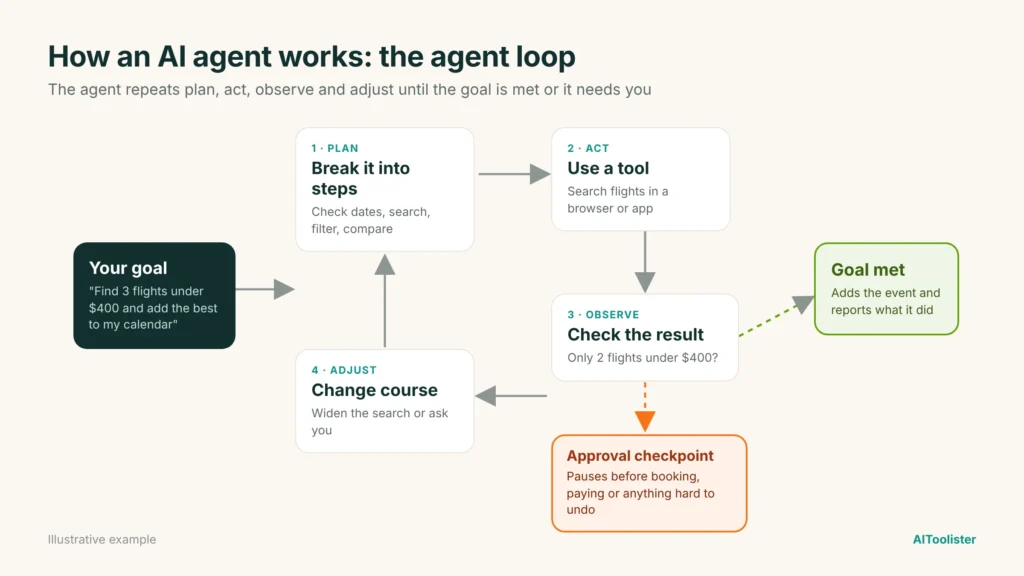
The easiest way to understand how an AI agent works is to watch one handle a request. Say you type:
“Find three return flights from New York to Chicago for next weekend, all under $400, and add the best one to my calendar.”
Here’s roughly what an agent does with that, step by step.
- It turns the request into a plan. The AI model behind the agent, usually a large language model (LLM), breaks the goal into smaller jobs: check the dates for “next weekend,” search for flights, filter by price, compare the options, then create a calendar entry.
- It uses a tool. It opens a flight search through a website or a connected app and enters the route and dates. This is the moment it stops being a chatbot: it’s acting, not just writing.
- It reviews the results and adjusts. If only two flights come in under $400, it decides whether to widen the search, try other times or check with you, rather than quietly breaking your rule.
- It compares and picks. It weighs price, total travel time and number of stops, then ranks the options against what you asked for.
- It pauses for approval. Before anything that can’t be easily undone, like booking or paying, a well-designed agent asks you to confirm. In this case, it only needs permission to add a calendar entry.
- It finishes and reports back. It creates the event, then tells you what it did and why it chose that flight.
That cycle of plan, act, observe and adjust is often called the agent loop. It repeats until the goal is met or the agent needs your input.
[Image 1: Diagram of the agent loop (goal → plan → act → observe → adjust, with an approval checkpoint).]
The parts that make it work
Under the hood, most AI agents are built from the same few pieces:
- A model that reasons and plans. This is the “brain,” usually an LLM.
- Tools it can use, such as search, a browser, email, a calendar, a code runner, or a company database.
- Instructions and limits that say what it may and may not do, and when it must ask first.
- Memory, optionally, so it can keep track of earlier steps or your preferences.
AI Agent vs Chatbot vs Automation
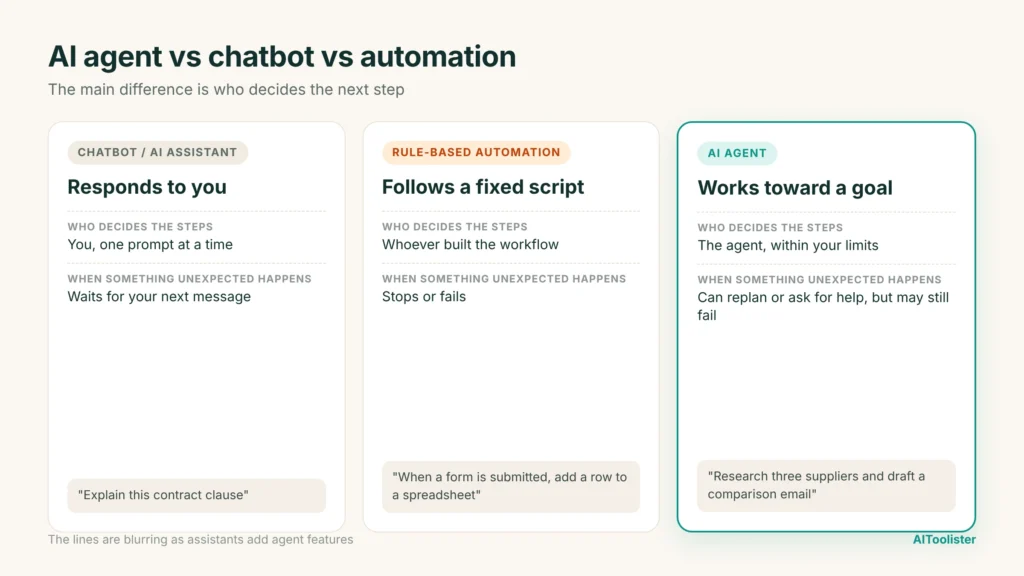
People often use “chatbot,” “automation” and “AI agent” as if they mean the same thing. They don’t, and the difference mostly comes down to who decides the next step and who carries it out.
| Chatbot or AI assistant | Rule-based automation | AI agent | |
| What it does | Answers questions and drafts content | Runs the same fixed steps every time | Works toward a goal you set |
| Who decides the steps | You, one prompt at a time | Whoever built the workflow | The agent, within your limits |
| Takes actions in other apps | Usually not | Yes, but only the ones it was set up for | Yes, choosing which tools to use |
| When something unexpected happens | Waits for your next message | Stops or fails | Can try another approach, replan or ask for help, but may still fail |
| Example | Asking an AI to explain a contract clause | “When a form is submitted, add a row to a spreadsheet” | “Research three suppliers and draft a comparison email” |
These lines are blurring as chat assistants add agent features and automation tools add AI steps. The useful question is simple: does it decide and act on its own, or does it wait for you?
[Image 2: Three-column graphic comparing a chatbot, a rule-based automation and an AI agent.]
The Five Classic Types of AI Agents
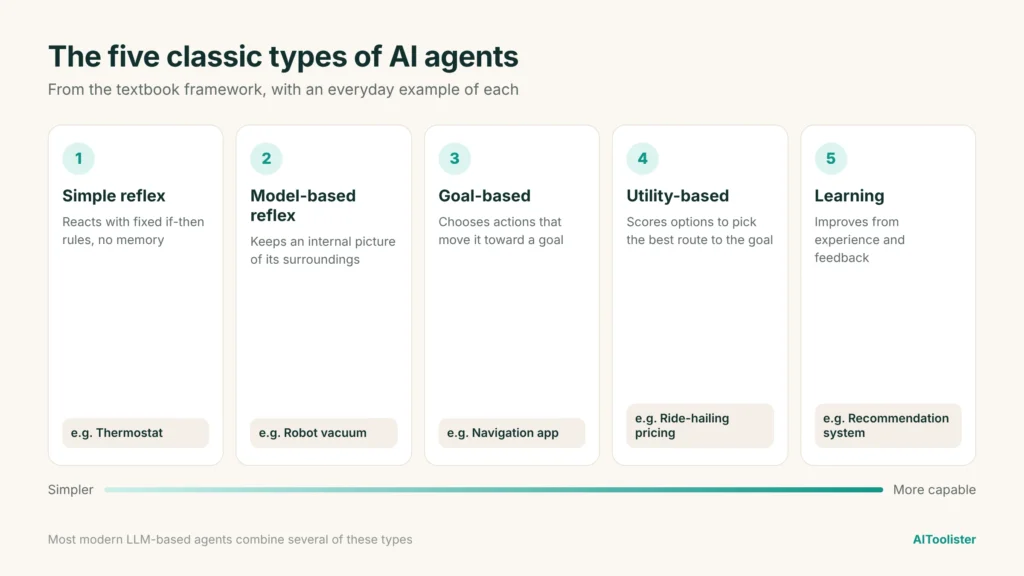
Computer science textbooks sort AI agents into five classic types, based on how they decide what to do. This framework predates today’s LLM-based agents, but it still gives the clearest answer to “what are the 5 types of AI agents?”
- Simple reflex agents react to what’s in front of them using fixed if-then rules and have no memory. A basic thermostat that turns the heat on when the temperature drops below a set point is the classic example.
- Model-based reflex agents keep an internal picture of their surroundings, so they can handle things they can’t see right now. A robot vacuum that maps your rooms and remembers where it has already cleaned works this way.
- Goal-based agents pick actions that move them toward a goal. A navigation app that plans a route to your destination and replans when you miss a turn is goal-based.
- Utility-based agents go a step further and choose the best way to reach a goal by scoring options, such as fastest, cheapest or safest. A ride-hailing system that balances wait time, distance, and price is a good example.
- Learning agents improve from experience and feedback. A recommendation system that gets better at suggesting shows as you watch, skip and rate them is a learning agent.
Most modern AI agents blend several of these. An LLM-based agent can pursue goals, weigh options and use feedback to adjust its approach during a task. That doesn’t mean the underlying model permanently learns from each job unless it’s specifically built and retrained to do so.
[Image 3: Graphic of the five classic types of AI agents with an everyday example for each.]
What AI Agents Actually Do in Different Jobs
AI agent examples are easiest to understand by the job they do rather than by brand name. Here are the most common uses today, and where a person still needs to step in.
Coding. Coding agents can read a project, write new code, run tests, find the cause of a bug and propose a fix across several files. Human checkpoint: a developer reviews the changes before they go live, because code that runs isn’t always code that’s correct or secure.
Research. A research agent can run dozens of searches, read the results, compare sources and put together a report with the key points. Human checkpoint: you check the important facts and figures, because agents can still misread a source or rely on an outdated page.
Customer service. Support agents answer common questions, look up orders, process simple requests like returns, and escalate harder cases to a person. Human checkpoint: refunds above a set amount, complaints and sensitive issues go to a human.
Workplace tasks. Inside office software and business tools, agents can summarise long email threads, prepare meeting notes, update CRM records, or pull figures into a report. If you run a small company, our guide to the best AI tools for business covers tools that now include features like these. Human checkpoint: anything sent to customers or changed in important records gets a final look.
The pattern is the same across all four: the agent does the legwork, and a person approves anything with real consequences.
AI Agents, Agentic AI and Multi-Agent Systems
You’ll often see “AI agent” and “agentic AI” used as if they’re the same thing, and in everyday writing they usually are. When people do draw a line, it usually comes down to this: an AI agent is the system doing goal-directed work, while agentic AI describes the broader style of systems that do it.
- An AI agent is a system that works toward a goal by choosing actions and using the tools available to it, like the flight-booking example above.
- Agentic AI describes AI systems designed to pursue goals and take actions with some degree of autonomy. A multi-agent system is one possible approach, where multiple agents coordinate or collaborate on a task.
A multi-agent system uses several agents to divide or coordinate work toward a shared goal. For example, a research agent could gather facts, a writing agent could draft an article, and a review agent could check the draft against the original sources. Splitting the work this way can make each step more reliable, though it also adds more places where something can go wrong.
Can ChatGPT, Claude, Gemini and Copilot Act as Agents?
When you’re simply chatting with one of these assistants, asking questions and getting answers, it’s working as an assistant, not an agent. All four companies now offer agent features on top of the chat, and those can take actions for you. Here’s where each stands as of October 2026. Product names and plan details change often, so check the current options before you rely on a specific feature.
ChatGPT
OpenAI’s agent features let ChatGPT handle longer, multi-step tasks rather than just replying. Its Work feature can research a topic, use connected apps and a browser, and produce finished documents, spreadsheets or presentations, pausing so you can approve important actions. A separate coding agent, Codex, handles software work. Access depends on your plan, workspace settings and region, and usage limits vary.
Claude
Anthropic’s Claude can act as an agent in a few ways. Claude in Chrome, a browser extension available on all paid Claude plans as of writing, can read pages, click, fill out forms, and move between tabs using your existing logins. You can either approve each action or let it work on its own within safety checks. For software work, Claude Code acts as a coding agent that can read, write and test code.
Gemini
Google’s Gemini Spark is a personal AI agent designed to help carry out tasks across Google services. As of September 2026, Google lists its Chrome and Google Photos integrations as available to Google AI Pro and AI Ultra subscribers in the United States. Availability and specific capabilities vary by subscription and region.
Microsoft Copilot
In Microsoft 365 Copilot, agents are specialised helpers built for particular jobs. For example, the Researcher agent runs multi-step research across the web and your work files, emails and meetings, then writes a report with sources. Businesses can also build their own agents with Microsoft’s tools to retrieve information, summarise data, or take actions such as sending emails and updating records. Access depends on your Microsoft 365 license and your organisation’s settings.
The short answer: ChatGPT, Claude, Gemini and Copilot are all AI assistants first. Each can act as an AI agent when you use its agent features, but the plain chat window on its own isn’t one.
Which Tasks Should You Trust an Agent With?
Agents are useful, but they still make mistakes, and the damage depends on what they can touch. A simple way to decide is to sort tasks by what happens if the agent gets it wrong.
| Risk level | Example tasks | How to handle it |
| Low: easy to check, nothing changes | Researching a topic, comparing products, summarizing documents, drafting a first version of a post or report | Let the agent work, then skim the result and check key facts |
| Medium: changes something you can undo | Sending emails, editing shared files, updating a spreadsheet or CRM, scheduling meetings | Review before it’s sent or saved, and keep a copy of the original |
| High: hard or impossible to undo | Payments and purchases, deleting files or records, sharing private data, changing account settings or passwords | Require your explicit approval for each action, or don’t hand it over at all |
Two more risks are worth knowing about. First, agents that browse the web can encounter hidden instructions planted on a page, a trick called prompt injection, that tries to steer them off task. Second, every app you connect gives the agent more reach. Give it access only to what the task needs, and remove access when you’re done.
A Five-Step Plan for Trying Your First Agent
You don’t need to be technical to try an AI agent. The safest way to start is to keep it small and deliberate.
- Pick one boring, low-risk task. Something you do every week that takes time but won’t break anything if it goes wrong, like gathering news on a topic, comparing three suppliers, or drafting social posts. If you create content, our roundup of AI content creation tools is a good place to find tools with these features.
- Define what “done” looks like. Be specific: “a table of five options with price, rating and one pro and con each” works far better than “find me some options.”
- Give the minimum access. Connect only the apps or folders this task needs. Don’t hand over email, payments or admin rights for a research job.
- Set approval points. Turn on confirmations for anything that sends, buys, deletes or shares, so the agent stops and asks first.
- Check the result, then adjust. Compare the output with what you’d have done yourself. If it’s good, give the agent slightly more responsibility next time. If it isn’t, tighten your instructions.
Once you’re comfortable, you have three ways to go further: use the agent features built into tools you already pay for, build a simple agent with a no-code builder that connects apps without programming, or, if you’re a developer, create your own agent with code using an AI model and the tools it needs.
Frequently Asked Questions
Who are the “big 4” AI agent companies?
There’s no official list. When people say “the big 4,” they usually mean OpenAI (ChatGPT), Google (Gemini), Anthropic (Claude) and Microsoft (Copilot), because all four offer widely used assistants with agent features.
What is the salary of an AI agent?
An AI agent is software, so it doesn’t earn a salary. The question usually refers to jobs building AI agents, such as AI engineer or AI agent developer roles. Pay for those roles varies widely by country, experience and company, so check current job listings in your area for realistic figures.
Can AI agents work without humans?
Some can complete whole tasks on their own, and some can run on a schedule in the background. Most still need a person to set the goal, give access and approve important actions. For anything involving money, private data, or customers, keep a human in the loop by default.
Is an AI agent the same as an AI assistant?
Not quite. An AI assistant mainly responds to what you ask, one message at a time. An AI agent takes a goal and acts on it, choosing steps and using tools. Many assistants now include agent features, so one product can be both.
The Takeaway
An AI agent does things, not just says things: it takes a goal, plans steps, uses tools, and checks its work. Start with one low-risk task, keep approvals on for anything important, and give it more responsibility only as it earns your trust.
Keep Exploring