Ahsan Javaid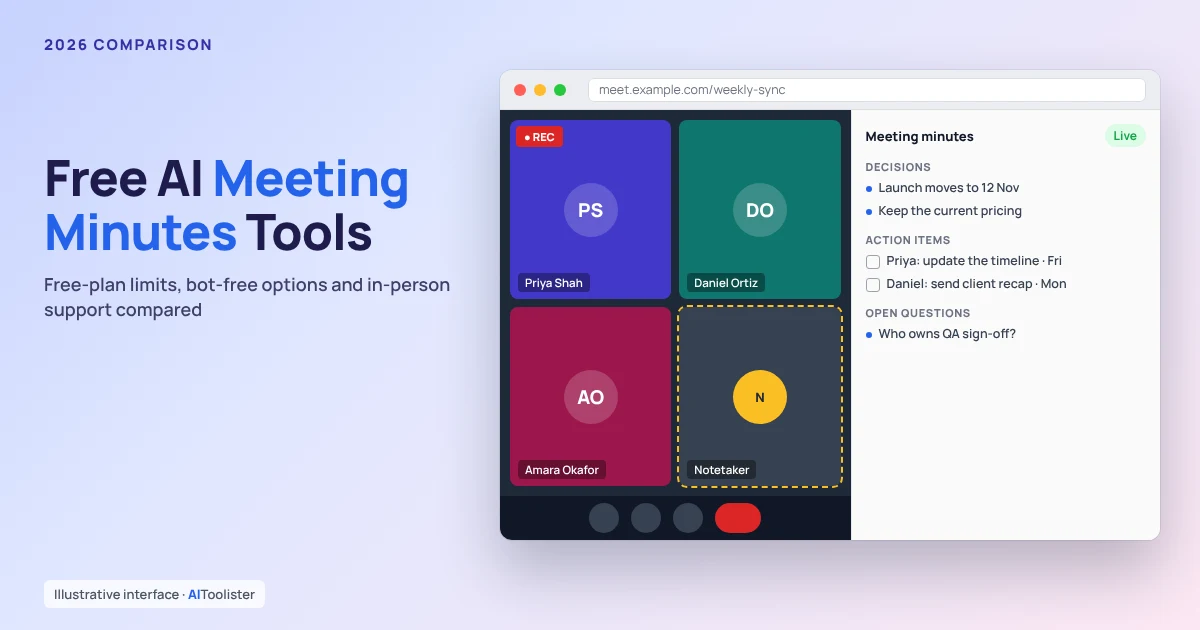
Meeting minutes AI free tools differ most in the fine print: how many minutes the free plan covers, whether a bot joins your call, and whether it works for in-person meetings. Fathom has one of the most generous documented free plans for online meetings, Otter suits both online and in-person meetings, and Tactiq, Granola and tl;dv offer ways to take notes without a bot on the call.
This comparison uses each provider’s official pricing and help pages, checked on 26 October 2026. We didn’t test the tools hands-on, and free plans change often, so check the current limits before you rely on one. Whichever tool you use, tell participants before you record or transcribe a meeting, because consent rules vary by location.
The Best Free AI Meeting Minutes Tools at a Glance
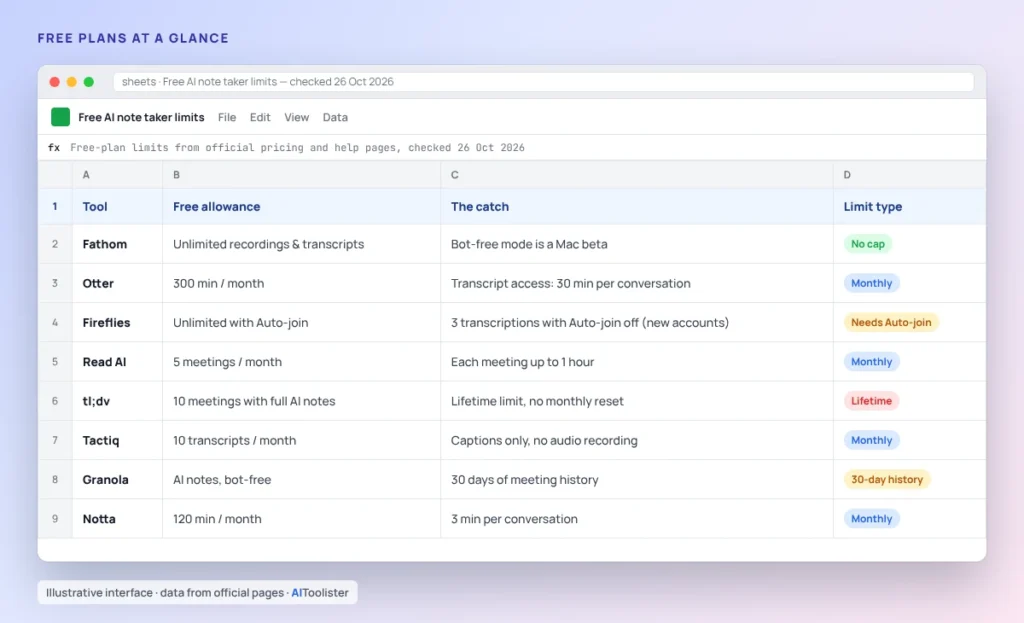
Last checked: 26 October 2026.
| Tool | Best for | Free allowance | How it captures | In-person | Platforms | Paid from |
|---|---|---|---|---|---|---|
| Fathom | Frequent online calls | Unlimited recordings and transcripts; some AI features limited | Bot joins, or bot-free capture (Mac, beta) | Not stated | Zoom, Google Meet, Teams | $16/mo billed annually |
| Otter | Online and in-person meetings | 300 min a month; transcript access capped at 30 min per conversation | Meeting agent joins; mobile and web recording | Yes, mobile app | Zoom, Google Meet, Teams | $8.33/mo billed annually |
| Fireflies | Flexible capture | Unlimited transcription with Auto-join; otherwise 3 transcriptions on newer free accounts; 400 min storage | Bot joins via calendar, or Chrome extension without a bot | Yes, mobile app | Zoom, Google Meet, Teams, Webex | $10/mo billed annually |
| Read AI | Summaries across meetings | 5 meetings a month, up to 1 hour each | Joins your call | Yes, mobile apps | Zoom, Google Meet, Teams | $15/mo billed annually |
| tl;dv | Occasional use | 10 meetings with full AI notes, lifetime | Bot joins; audio-only desktop mode without a bot (free-plan availability not verified) | Not verified | Zoom and Teams documented | $18/mo (Pro) |
| Tactiq | Transcripts without a bot | 10 transcripts and 5 AI credits a month | Browser extension that reads live captions; no audio recording | No | Google Meet, Zoom, Teams | $8/mo billed annually |
| Granola | Bot-free desktop notes | 30 days of meeting history | Captures audio from your device; no bot | Not stated | Desktop and mobile apps | $14/mo |
| Notta | Short calls and file uploads | 120 min a month, 3 min per conversation | Not stated | Not stated | Zoom, Google Meet, Teams, Webex, Slack | $8.17/mo billed a |
Some of these tools record audio, some only capture a transcript, and the DIY method below only turns an existing transcript into minutes. That difference matters if you need a recording to check what was said.
How We Compared These Tools
Every detail in this article comes from the provider’s own pricing, plan or help pages. Where a page didn’t say something, it’s marked “not stated.” Where we couldn’t confirm it, we mark it “not verified.”
We also separated three kinds of “free”:
- Ongoing free plans that reset each month, like Otter and Tactiq
- Lifetime allowances that don’t reset, like tl;dv’s 10 meetings with full AI notes
- Features that come with a paid workplace subscription, like the note-taking built into Google Meet, Zoom and Microsoft Teams
The Best Free AI Meeting Minute Takers
Fathom
Best for: people with frequent Zoom, Google Meet or Teams calls who want a free plan without a minute cap.
Fathom’s free plan includes unlimited recordings and transcriptions, while some AI features are labelled “limited use.” By default, Fathom’s bot joins the call. You can choose bot-free capture instead, but that option is in beta and only available on Mac. Compared with the other tools here, Fathom stands out for its free online-meeting limits.
The catch: if you’re on Windows and don’t want a bot in the call, you can’t use the free bot-free option. Fathom’s pages don’t mention in-person meetings.
Paid from: Premium at $20 a month, or $16 a month billed annually.
Otter
Best for: a mix of online and in-person meetings.
Otter’s free Basic plan gives you 300 transcription minutes a month, shared between meetings and recordings. Its meeting agent joins Zoom, Google Meet and Teams calls, and the iOS and Android apps let you record in person. You can also import 3 audio or video files over the lifetime of the account and ask 20 AI chat questions a month.
The catch: each conversation is limited to 30 minutes of accessible transcription on the free plan. Otter says longer recordings won’t stop, but you can’t access transcripts beyond 30 minutes unless you upgrade.
Paid from: Pro at $16.99 a month, or $8.33 a month billed annually.
Fireflies
Best for: people who want the choice between a meeting bot and no bot.
Fireflies’ bot joins meetings through your calendar. Its Chrome extension can record meetings without adding a bot, and its mobile app transcribes in-person meetings. That makes Fireflies more flexible than tools that only cover one meeting format.
For accounts created on or after 1 September 2026, Fireflies gives unlimited transcriptions only when Auto-join is enabled for eligible calendar meetings. With Auto-join off, the free plan includes 3 meeting transcriptions. The free plan also includes 20 AI credits, but Fireflies’ help pages describe them inconsistently, once as monthly and once as one-time, so check your account before relying on them.
The catch: free storage is capped at 400 minutes, which Fireflies describes as per seat in its help centre and per team in its pricing guide. Once it’s full, you’ll have to delete older meetings. One help page also caps recordings at 2 hours per meeting.
Paid from: Pro at $18 a month, or $10 a month billed annually.
Read AI
Best for: summaries and meeting coaching across Zoom, Google Meet and Teams.
Read AI’s free plan covers 5 meetings a month, with summaries, transcription and a personalised meeting coach. It joins and records meetings whether you’re the host or just a participant, and its mobile apps can capture in-person meetings.
The catch: the free plan includes 5 meetings a month, each limited to 1 hour.
Paid plans start at Pro for $19.75 a month, or $15 a month billed annually.
tl;dv
Best for: occasional users who want to try full AI notes.
tl;dv’s desktop app has two modes: video with a bot, or audio-only without a bot. On the free plan, your first 10 meetings get automatic AI notes for the whole meeting. After that, the app automatically summarises only the first 10 minutes of each meeting. Recordings can be up to 3 hours long. We couldn’t verify whether the bot-free mode is available on the free plan.
The catch: the free limits are for the lifetime of the account and don’t renew monthly, and free recordings are stored for 3 months.
Paid from: Pro at $18 per user per month.
Tactiq
Best for: getting transcripts of online meetings without a bot.
Tactiq is a Chrome and Edge browser extension. It reads the meeting platform’s live captions to build a transcript, so nothing joins the meeting as a separate participant. The free plan includes 10 transcripts and 5 AI credits per month.
The catch: Tactiq works from captions, not an audio recording, and its help centre doesn’t say it records audio. In Zoom, it only works when you join through the browser and enable captions. It doesn’t cover in-person meetings.
Paid from: Pro at $8 a month, billed annually.
Granola
Best for: people who want AI notes from their own device without a bot.
Granola captures device audio, so no bot joins the call. Its free Basic plan includes AI meeting notes, AI chat, note templates and multi-language support, with desktop, iOS and Android apps. That makes it a straightforward option for people who want bot-free notes from their own device.
The catch: free meeting history is limited to 30 days. Granola’s pricing page doesn’t mention in-person meetings, so it doesn’t support them.
Paid from: Business at $14 per user per month.
Notta
Best for: very short calls and uploaded recordings.
Notta’s free plan includes 120 transcription minutes a month, 10 AI summaries and 50 file uploads. It supports Zoom, Google Meet, Teams, Webex and Slack, but its short meeting limit makes it less useful for live calls than the other tools here.
The catch: each conversation is limited to 3 minutes on the free plan, which makes it impractical for live meetings.
Paid from: Pro at $8.17 a month, billed annually.
Built-in options: Google Meet, Zoom and Microsoft Teams
The note-taking built into your meeting app depends on which subscription you have:
- Google Meet “Take notes for me”: needs an eligible Google Workspace edition or Google AI plan, and the meeting organiser must have it. Google’s help page describes it as available for work or school accounts or with an eligible Google AI plan. It saves notes to a Google Doc.
- Zoom AI Companion: included with paid Zoom Workplace plans. Zoom’s December 2025 AI Companion 3.0 announcement says “select AI Companion capabilities are also available for Zoom Workplace Basic users to try” without naming which ones, and that Basic users can buy AI Companion as a $10-a-month add-on.
- Microsoft Teams intelligent recap: on top of a Microsoft 365 subscription that includes Teams, users need a Teams Premium or Microsoft Copilot licence, according to Microsoft’s documentation.
If your workplace already pays for one, it may be the simplest option. With a free personal account, a separate tool is usually more practical.
Bot-Free vs Bot-Joins: Which Should You Choose?
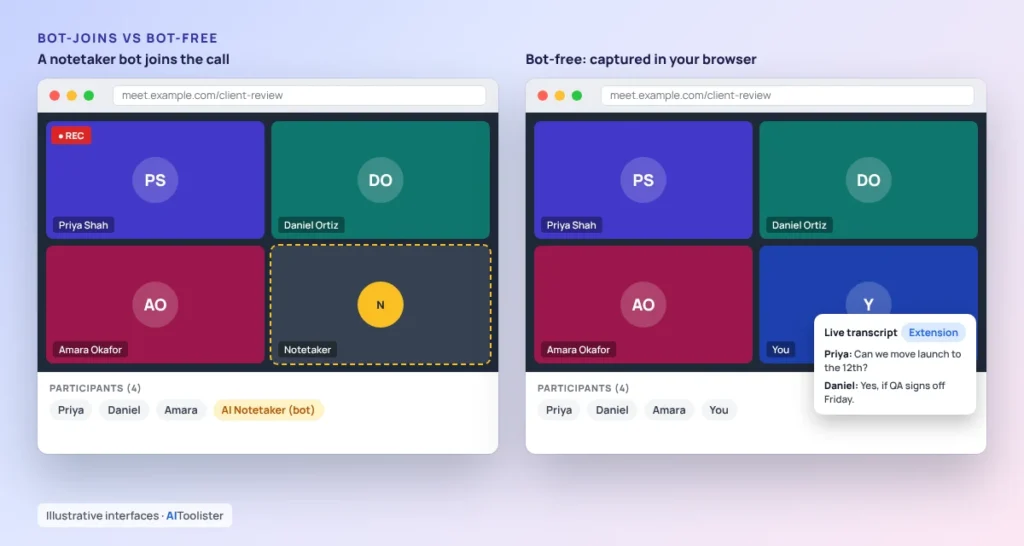
A meeting bot joins the call as an extra participant, records it and sends you notes afterwards. Fathom, Otter, Fireflies, Read AI and tl;dv all offer this. It works even when you’re not at your computer, and everyone in the meeting can see it. Compared with bot-free options, it is the more visible setup.
Bot-free tools capture the meeting from your own device or browser instead:
- Tactiq reads live captions in your browser.
- Granola captures audio from your device. tl;dv’s audio-only mode does the same, though we couldn’t verify whether it’s included on the free plan.
- Fireflies’ Chrome extension records without adding a bot.
- Fathom offers bot-free capture as a Mac beta.
Bot-free capture avoids an unexpected participant appearing in someone else’s meeting, which some clients and organisers dislike. The trade-off is that it only works while you’re in the meeting on that device. Speaker labels can be weaker too: Fathom says most bot-free tools drop speaker attribution, while its own beta keeps it.
Either way, other people in the meeting should know they’re being recorded or transcribed.
Best Free AI Note Takers for In-Person Meetings
For in-room meetings, you need a tool that records from your phone or computer microphone. Three of the tools here document in-person support on their mobile apps:
- Otter: iOS and Android apps, and recording through the built-in mic, Bluetooth or AirPods. On the free plan, you can only access the first 30 minutes of each transcript.
- Fireflies: its mobile app transcribes in-person meetings.
- Read AI: its Android and iOS apps capture in-person meetings.
A few practical points help. Place the phone in the middle of the table, close to the people speaking. Tell everyone in the room that you’re recording. Expect less accurate speaker labels than in an online call, where each person has their own audio stream.
Can ChatGPT Take Meeting Minutes? A Free DIY Method
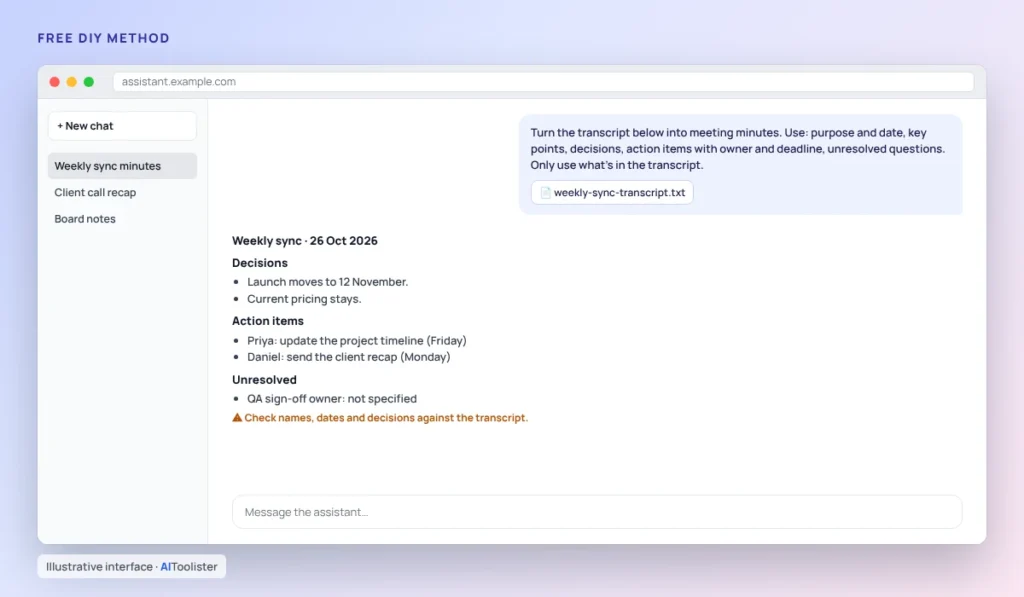
ChatGPT, Claude and similar assistants can turn a transcript or rough notes into well-structured minutes. They don’t automatically record or transcribe your meeting for free in every setup, so you’ll usually need a transcript first.
- Get a transcript. Use a free plan from the tools above, your meeting app’s own transcript, or notes you typed during the meeting.
- Paste it into the assistant with a clear prompt. You can reuse the one below.
- Check the minutes against the transcript. AI can misattribute who said what or miss a decision.
Turn the transcript below into meeting minutes. Use these sections:1. Meeting purpose and date2. Attendees (if mentioned)3. Key discussion points4. Decisions made5. Action items, each with an owner and deadline6. Unresolved questions or follow-upsOnly include information that appears in the transcript. If an owner or deadline isn't stated, write "not specified".Transcript:[paste transcript here]
Don’t upload confidential meeting material to an AI assistant unless your organisation allows it. Many workplaces have rules about which AI tools staff can use.
Privacy and Consent: What to Check Before You Record
Privacy questions about meeting tools fall into three separate areas.
1. Can other attendees see that you’re recording? A meeting bot appears in the participant list. Bot-free tools may not show up at all, so you need to tell people. Recording and consent laws differ by country and US state, and some require everyone’s consent.
2. How long are recordings stored, and where? This varies by plan. For example, tl;dv’s free plan stores recordings for 3 months, and Fireflies’ free plan caps storage at 400 minutes, after which you delete older meetings. On work accounts, your admin may control which tools can join meetings. Read AI, for instance, says Workspace admins can control which meetings it joins.
3. Is your content used to train AI models? Granola’s pricing page lists a per-user option to opt out of model training on every plan. For the other tools, check each provider’s privacy policy and settings before recording sensitive conversations. We haven’t verified their current training policies.
How to Choose the Right Free Meeting Minutes Tool
- Solo freelancer with frequent client calls: Fathom, for its unlimited free recordings. Our guide to the best AI tools for freelancers covers tools to pair with it.
- Small team on Google Meet, no bot wanted: Tactiq for transcripts, or Fathom on Mac in bot-free beta. For more team tools, see the best AI tools for small businesses.
- In-person meetings: Otter, Fireflies, or Read AI, using their mobile apps.
- No bot allowed, notes from your own device: Granola, whose free plan includes bot-free capture.
- A few meetings a month: Read AI’s 5 free meetings of up to an hour each, or the DIY transcript-to-minutes method.
FAQ
What is the best free AI for meeting minutes?
It depends on your meetings. For online calls, Fathom has one of the most generous documented free plans, with unlimited recordings and transcripts. For in-person meetings, Otter’s mobile app is a better fit, though the free plan limits you to the first 30 minutes of each transcript. If you can’t have a bot in the call, look at Tactiq or Granola.
Can AI create minutes for meetings?
Yes. AI meeting tools generate summaries, decisions and action items from a recording or transcript, and assistants like ChatGPT or Claude can do the same if you paste in a transcript. Always check the results, because AI can misattribute who said what or miss decisions.
Can I use Minutes AI for free?
Several apps use the name “Minutes.” The Minutes.AI meeting recorder on Apple’s App Store is free to download with in-app purchases, but its listing doesn’t say what the free version includes. Check the app’s own pricing before relying on it.
Is there a free AI note taker for Zoom?
Yes. Fathom, Otter, Fireflies, Read AI and Tactiq all support Zoom on their free plans, each with different limits. Zoom’s own AI Companion is included with paid Zoom Workplace plans, and free Basic users can try select features.
Which free AI note taker doesn’t join the meeting?
Tactiq, Granola and the Fireflies Chrome extension work without a bot joining the call, and Fathom’s free plan offers bot-free capture as a Mac beta. tl;dv’s desktop app also has an audio-only mode without a bot, but we couldn’t confirm it’s available on the free plan.
The Bottom Line
The best free AI meeting minutes tool is the one whose limits fit your meetings. Check the free allowance per conversation, decide whether a bot in the call is acceptable, and confirm in-person support if you need it. Free plans change often, so recheck the provider’s pricing page before you commit.
Sources
Plan details were checked on 26 October 2026 against these official pages:
- Fathom pricing and Fathom bot-free note takers.
- Otter pricing and Otter Basic plan limits
- Fireflies free plan, Fireflies unlimited transcriptions with Auto-join and Fireflies pricing guide
- Read AI plans, pricing, and plan details.
- tl;dv free plan limits and tl;dv bot-free note takers
- Tactiq pricing and how to use Tactiq with Zoom
- Granola pricing
- Notta pricing
- Zoom AI Companion 3.0 announcement
Keep Exploring