Ahsan Javaid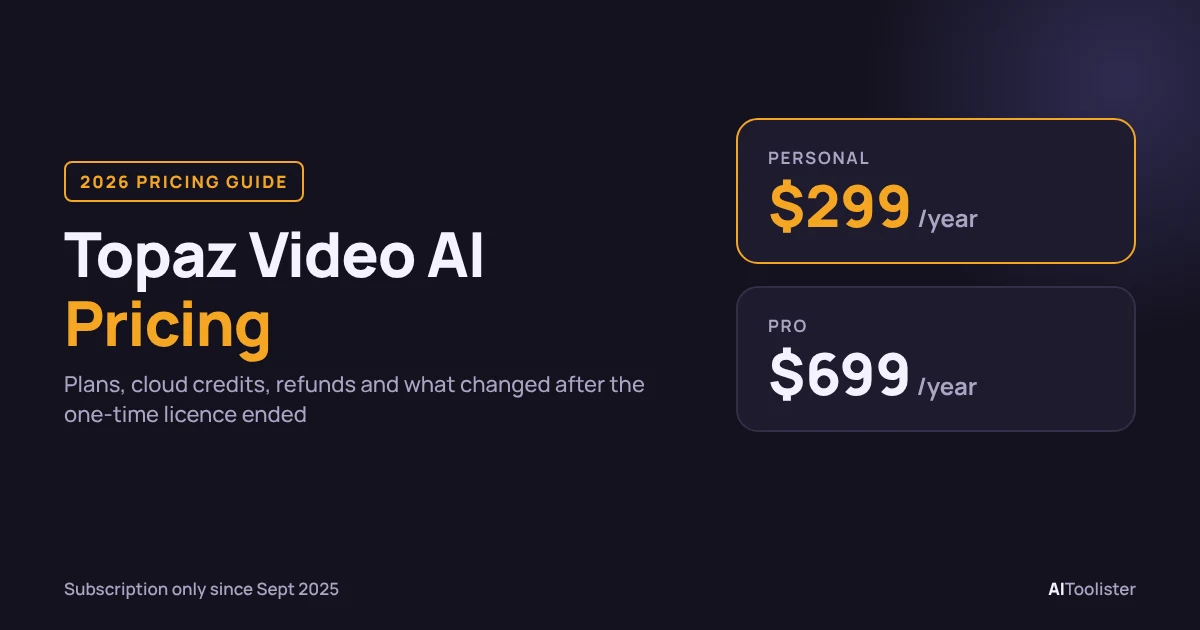
Topaz Video AI Pricing in 2026: Plans, Free Trial and What Changed
Topaz Video, the subscription app most people still search for as Topaz Video AI, costs $299/year for the Personal plan or $699/year for Pro. Personal is also available for $39/month on a 12-month commitment or $59/month with no commitment. There is no longer a one-time licence: Topaz discontinued the old Topaz Video AI in September 2025 and replaced it with Topaz Video, a subscription-only app.
The sticker price is only part of the cost. Cloud credits, the commercial-use cap on the Personal plan, early-exit fees on annual commitments and your own graphics card all change what you actually pay. This guide covers each, with every figure taken from Topaz’s own pages and checked on 16 October 2026.
How Much Does Topaz Video AI Cost in 2026?
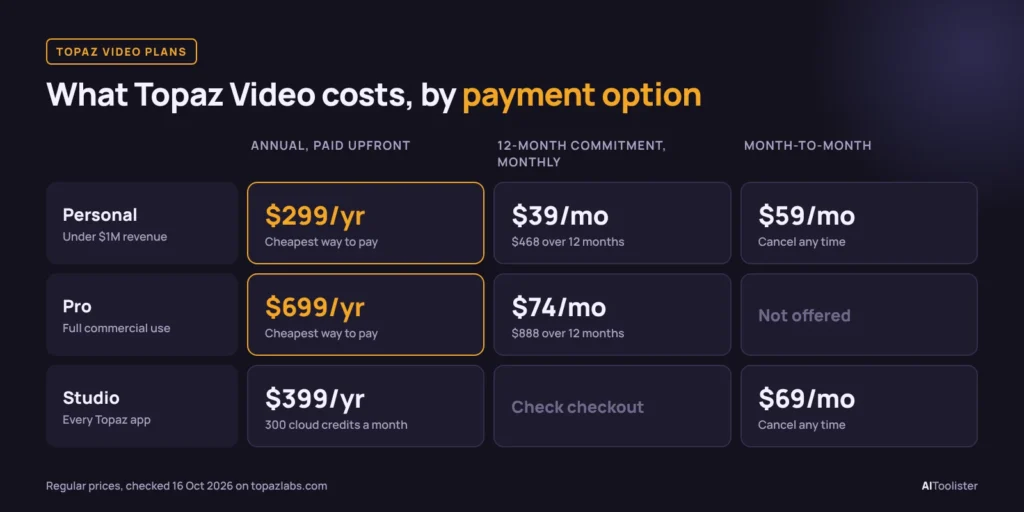
Topaz Video is sold in two tiers, Personal and Pro, with several payment options. These are the regular prices on Topaz’s pricing pages:
| Plan | Annual, paid upfront | Annual commitment, billed monthly | Month-to-month |
| Topaz Video Personal | $299/yr | $39/mo ($468/yr) | $59/mo |
| Topaz Video Pro | $699/yr | $74/mo ($888/yr) | Not offered |
| Topaz Studio (all apps) | $399/yr | Not listed on the product page | $69/mo |
Both Topaz Video plans include unlimited local rendering. That means you can process as much video as you like on your own computer, with no per-minute charge. You only pay extra when you send work to Topaz’s cloud servers, where cloud credits apply.
Three things to know before you buy:
- A promotion is running, but it doesn’t apply to this plan. Topaz’s pricing page shows a “save up to 50%” offer with no end date. The $199-a-year price you may see there belongs to the browser-based Topaz for Web Video plan (200 cloud credits, no local rendering), not the desktop Topaz Video app above. Check the final total at checkout.
- Prices are in US dollars. Topaz publishes no local-currency price list, so your bank’s exchange rate applies.
Is Topaz Video AI Still a One-Time Purchase?
No. For years, Topaz Video AI was sold as a one-time licence that included a year of updates. That model ended when Topaz discontinued Video AI in September 2025. Version 7.1.5, released at the end of that transition, is the final version and will receive no new models.
Its replacement, Topaz Video, is a different product that requires a paid subscription. The two names cause most of the confusion in search results:
- Topaz Video AI (also known by its older name, Topaz Video Enhance AI) is the legacy app. People who bought it still own their version.
- Topaz Video is the current app. New buyers can only get it on a subscription.
If you see a “lifetime Topaz Video AI licence” for sale on a third-party site, be careful. It may be a resold legacy licence that stops at version 7.1.5, or something less trustworthy. Topaz Labs sells new licences only through topazlabs.com.
Personal vs Pro: Which Topaz Video Plan Do You Need?
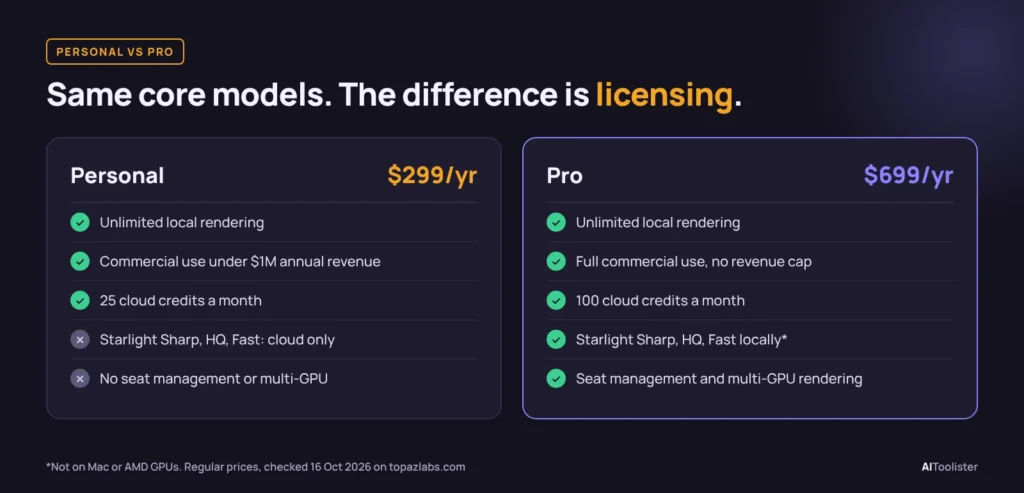
Both plans use the same core AI models and offer unlimited local rendering. The $400-a-year difference is mostly about licensing and a few professional features:
| What changes | Personal ($299/yr) | Pro ($699/yr) |
| Commercial use | Allowed for individuals and organisations under $1M annual revenue | No revenue limit |
| Cloud credits included | 25 per month | 100 per month |
| Starlight Sharp, HQ and Fast models | Cloud only | Can also run locally (not on Mac or AMD GPUs) |
| Seat management for teams | No | Yes |
| Multi-GPU rendering | No | Yes |
The simple rule: if you or the business you work for earns $1 million or more a year, you need Pro, whatever features you use. Freelancers and small studios under that line can use Personal for client work. Personal is the standard option for lower-revenue users; Pro is the higher-revenue option.
Pro is also worth considering if you rely on the heavier Starlight models and have an NVIDIA graphics card, because running them locally avoids spending cloud credits. On a Mac or an AMD card, those models still have to run in the cloud, so cloud credits affect the cost.
Monthly, Annual or Studio: Which Option Costs Less?
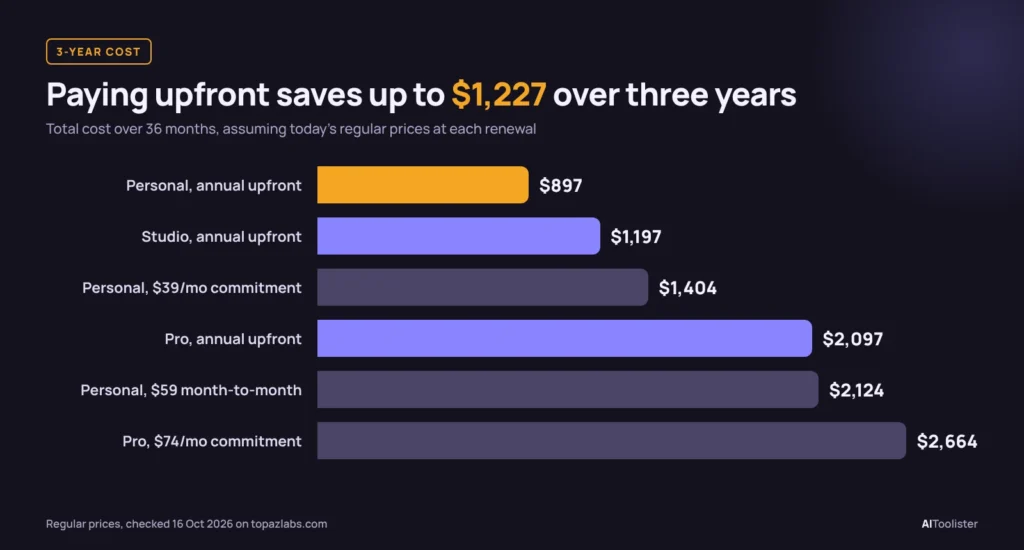
Paying upfront for a year is the cheapest route. The gap grows quickly over time. This table assumes today’s regular prices stay the same at renewal:
| Payment option | 1 year | 2 years | 3 years |
| Personal, annual upfront | $299 | $598 | $897 |
| Personal, annual billed monthly ($39/mo) | $468 | $936 | $1,404 |
| Personal, month-to-month ($59/mo) | $708 | $1,416 | $2,124 |
| Pro, annual upfront | $699 | $1,398 | $2,097 |
| Pro, annual billed monthly ($74/mo) | $888 | $1,776 | $2,664 |
| Studio, annual upfront | $399 | $798 | $1,197 |
Month-to-month only makes sense for a short project. If you need Topaz Video for one or two months to restore a batch of family videos, $59 or $118 is far cheaper than a year’s commitment. Beyond about five months, the annual plan works out cheaper.
When Topaz Studio is the better deal, it costs $100 more a year than Video Personal and includes every Topaz app: Topaz Photo, Gigapixel, the browser apps, and Topaz Video. It also includes 300 cloud credits a month, up from 25. If you edit photos as well as video, Studio is usually the better buy. Topaz Photo appears in our guide to the best AI tools for photographers if you want to compare it with other photo options. If you only work with video, Video Personal is enough.
Costs beyond the subscription
- A capable graphics card. Local rendering runs on your own GPU. Topaz supports NVIDIA, AMD and Apple Silicon hardware. Render speed depends heavily on the card, so long 4K jobs on older hardware can be slow.
- Intel Macs. According to Topaz staff, the current Topaz Video app does not support Intel Macs. Owners of older Macs would need new hardware or the browser version.
- Storage. Upscaled 4K and 8K files are much larger than the originals, so budget for extra drive space on long projects.
Cloud Credits, Topaz for Web and Starlight Pricing
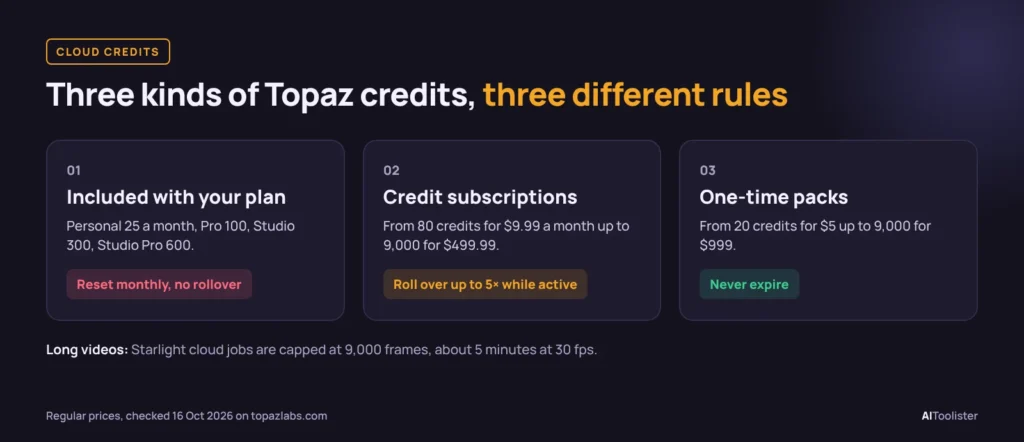
Cloud credits pay for rendering on Topaz’s servers instead of your computer. You need them for the heaviest Starlight models if your hardware can’t run them, or if you use the browser version. There are three kinds of credits, and they follow different rules:
1. Credits included with your app subscription. Personal includes 25/month, Pro 100, Studio 300, and Studio Pro 600. These reset monthly and don’t roll over, so you lose unused credits.
2. Separate credit subscriptions. These are monthly credit plans you buy in the app. They roll over while the credit subscription stays active, up to five times the monthly amount.
| Monthly credits | Price per month |
| 80 | $9.99 |
| 400 | $39.99 |
| 1,400 | $99.99 |
| 3,000 | $199.99 |
| 9,000 | $499.99 |
3. One-time credit packs. These never expire. Prices range from 20 credits for $5 to 9,000 credits for $999, so per-credit costs are higher than on the subscriptions.
How many credits a video uses. Cost depends on input resolution, output resolution, frame rate, length and the model. The examples in Topaz’s cloud rendering guide for a one-minute, 30 fps clip range from about 2 credits for a standard-definition source to about 121 credits for a 4K source upscaled 2x with Starlight Fast 2. Always check the quote in the app before you render, because that tells you the cloud-credit impact.
A limit on long videos. When you render Starlight models in the cloud, each job is limited to 9,000 frames. That is five minutes at 30 fps or two and a half minutes at 60 fps. Longer footage has to be split into several exports, and each part still costs credits. Topaz’s other cloud models have no frame limit.
Topaz for Web: the browser version
If you don’t have a suitable graphics card, Topaz for Web runs entirely in your browser. Its Video plan regularly costs $29 a month or $299 a year, with 200 cloud credits a month, two jobs running at once and file storage. It is currently on sale at $19 a month or $199 a year. A Web Pro plan adds 400 credits, image tools and full commercial use, regularly $59 a month or $599 a year, currently on sale at $35 a month or $329 a year. Those credits define the browser plan’s cost. Web Video is the lower-cost browser option; Web Pro is the higher-tier browser option.
The trade-off is that everything is metered. With the desktop app, a long restoration project costs nothing extra after you pay for the subscription. In the browser, every minute uses credits, so heavy users usually spend more.
Is There a Free Trial or Free Version of Topaz Video AI?
Topaz Video has no free version, and Topaz’s pricing pages don’t list a free trial for the current desktop app. In December 2025, a Topaz staff member confirmed on the official community forum that the current desktop version has no free trial.
The suggested workaround is the legacy Topaz Video AI, which you can still download from Topaz’s Legacy Products page to test quality and speed on your own footage. Keep in mind it is not the current app and lacks newer models like Starlight Sharp.
The closest thing to a trial for the current app is Topaz’s refund window: you can request a refund within 2 days of purchase. That is short, so test on real footage straight away if you buy.
Be wary of sites offering a “free Topaz Video AI download” or a “cracked” copy. They are not from Topaz and can carry malware.
What Happens When Your Subscription Ends (and to Old Licences)?
This depends on which product you have, and it is the point most competitor guides get wrong.
Topaz Video (current subscription app). When your paid time runs out, the app stops working until you renew. It is not like the old model where you kept the last version you had. The app also checks your subscription once a month, so you can work offline for up to one month. Download any models you need before going offline.
Topaz Video AI (legacy one-time licence). If you bought Video AI before it was discontinued, you own the version you bought:
- It keeps working after your update period “expires.” Expired refers only to updates, not access.
- You can run it on two computers at once, and you need to sign in once every six months.
- You can download your installer from the Legacy section of your Topaz account page.
- It includes no cloud credits and won’t receive new models.
For many hobbyists with an old licence, staying on Video AI 7.1.5 is a reasonable choice. Upgrade only if you need the newer models or the cloud features.
Cancelling, Refunds and the Annual Commitment Catch
Topaz’s refund policy is stricter than many software subscriptions:
- Refunds are only available within 2 days of purchase. After that, changing your mind is not grounds for a refund.
- Annual commitments are binding. Plans billed monthly on a 12-month commitment cannot be cancelled during the term without paying an additional fee. Topaz does not publish the fee amount.
- Cancel at least 24 hours before renewal. Cancelling on the renewal date may not stop that charge.
- Used cloud credits are generally not refundable.
To cancel, go to your Topaz Studio account page and open Subscriptions, then Manage. Cancelling stops the next renewal; it does not request a refund. Your access continues until the end of the period you have paid for. If you are using Topaz Video AI, the legacy app keeps working after cancellation, but it will not receive new models or updates.
This is why the $39-a-month option needs care. It looks like a monthly plan, but it is a year-long commitment paid in instalments. If you are unsure you will use Topaz Video for a full year, the $59 month-to-month plan is the only route you can stop freely.
Cheaper Topaz Video AI Alternatives
If the subscription doesn’t suit you, these tools also enhance and upscale existing video. Prices below are the regular prices listed on each developer’s own site:
| Tool | Price | Payment model | Worth knowing |
| Video2X | Free | Open source | Upscaling and frame interpolation; Windows and Linux; needs a Vulkan-capable GPU and some technical comfort |
| DaVinci Resolve Studio | $295 | Single listed price, no subscription shown | A full video editor rather than a dedicated AI enhancer; includes Super Scale upscaling and AI noise reduction, which the free DaVinci Resolve lacks |
| AVCLabs Video Enhancer AI | $39.95/mo, $119.95/yr, or $299.90 lifetime | Subscription or one-time | Lifetime licence currently discounted |
| HitPaw VikPea | $87.99/mo, $137.99/yr, or $437.99 perpetual (Mac prices) | Subscription or one-time | Free version only previews; exports need a paid plan |
A few honest caveats. Topaz’s model range, especially Starlight, is the main reason people pay for it, and none of these tools is a like-for-like replacement for every Topaz model. You can best judge quality on your own footage. Promotional prices on these sites change often, so check the current offer before buying.
If you also create new video, not just restore old footage, our guide to the best AI tools for content creators covers editing, repurposing, and generation tools.
Frequently Asked Questions
How much is Topaz Video AI per month?
Topaz Video Personal costs $59 a month with no commitment, or $39 a month on a 12-month commitment. Paying $299 upfront for a year works out to about $25 a month. Pro has no month-to-month option; it costs $74/month on a 12-month commitment or $699 upfront for a year.
Do Topaz cloud credits roll over?
Credits included with a Topaz Video or Studio subscription don’t roll over; they reset monthly. Separate credit subscriptions roll over up to five times the monthly amount while active, and one-time credit packs never expire.
Can I use Topaz Video Personal for client work?
Yes, if you are an individual or an organisation earning under $1 million a year. Above that revenue level, Topaz requires the Pro plan for commercial use.
Is Topaz Video AI the same as Topaz Video Enhance AI?
Yes. Topaz Video Enhance AI was renamed Topaz Video AI, which was discontinued in September 2025. The current subscription app is called Topaz Video.
Is Topaz Video AI worth it?
It is worth it if you regularly restore or upscale footage and have a capable GPU, because local rendering is unlimited for a fixed yearly price. Choose the annual upfront plan to keep the cost at $299. For one short project, the month-to-month plan is cheaper. If you only process video occasionally or have no suitable graphics card, a one-time alternative or the browser version may cost less over time.
Keep Exploring