
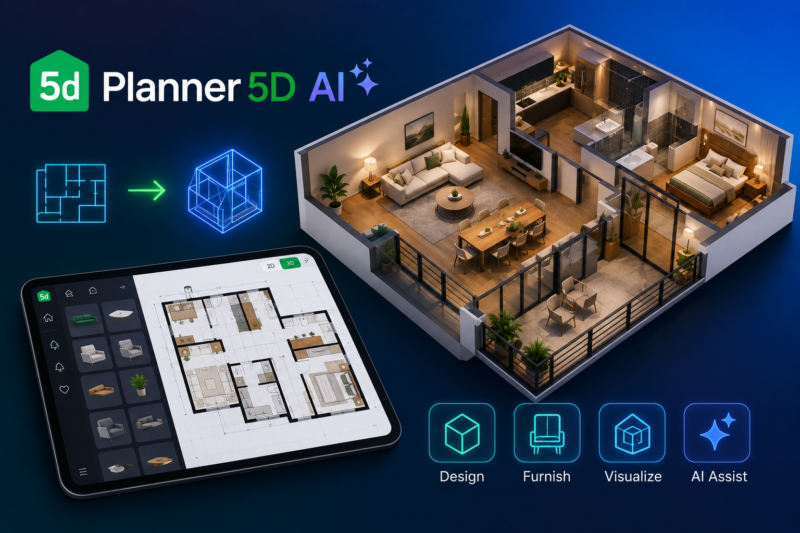
Planner 5D AI

Quick Links

Visit Official Website
Reviewed & Updated: August 11, 2026Pricing, features, and availability may change. Always verify the latest information on the official website.
Planner 5D AI
Pricing: Freemium
Free Trial: Yes
Best For: Homeowners and students wanting to build accurate 2D floor plans and 3D home designs with AI assistance at a low price
Starting Price: $4.99 per month
Platform: Web, iOS, Android, Windows
Target Users: Homeowners planning renovations, Students learning design, DIY enthusiasts, Design professionals wanting an affordable tool
Use Cases: Drawing a 2D floor plan and converting it into a 3D home design, Uploading an existing floor plan for AI-assisted conversion into an editable project, Using the AI Design Generator to propose furnished interior layouts, Furnishing a room automatically using AI-driven furniture arrangement, Visualizing a finished design with photorealistic renders up to 4K
Languages: English, Multiple additional languages
Integrations: None natively
AIToolister Review

Most AI interior design tools work from a photo of an existing room; Planner 5D works from the ground up, letting users draw an actual floor plan and turn it into a full, furnished 3D home design in around ten minutes. That spatial-planning foundation, combined with a genuinely low-cost Premium tier, makes it a different kind of tool than the photo-restyling apps that dominate the category.

What is Planner 5D AI?

Planner 5D is a cross-platform home design application that lets users draw or upload a 2D floor plan and turn it into a full 3D home design, blending traditional drag-and-drop layout tools with newer AI-assisted features. Unlike photo-restyling tools that redesign an existing room from an image, Planner 5D is a genuine spatial design application: users build or import a floor plan, lay out walls and rooms, furnish from a catalog of more than 10,000 items, and visualize the result in 3D with renders up to 4K. Its AI layer adds floor-plan recognition that converts an uploaded plan into an editable project, an AI Design Generator that proposes furnished interiors, an automatic room generator, and automated furniture arrangement, letting beginners get a furnished space quickly while professionals retain full manual control.

Key features

AI Floor Plan Recognition

Converts an uploaded floor plan image into an editable project within Planner 5D, saving the time of manually redrawing an existing layout from scratch.

AI Design Generator

Proposes furnished interior designs based on a room's layout and a selected style, giving users a starting point that can then be manually refined.

Automated Furniture Arrangement

Automatically arranges furniture within a room based on its dimensions and layout, speeding up the process of visualizing a fully furnished space.

Large Furniture Catalog

Offers more than 10,000 furniture and decor items on paid tiers, letting users furnish a design with realistic, varied options rather than a limited generic library.

Cross-Platform Availability

Runs on web, iOS, Android, and Windows, including support for newer platforms like Vision Pro, letting users design across whichever device they prefer.

Photorealistic Renders

Generates renders up to 4K resolution, giving users a polished, presentation-ready visualization of their finished design.

Pros

  • Genuinely one of the most affordable AI-assisted design tools available, with Premium at just $4.99 per month billed annually
  • The free tier is substantial enough for real casual planning, including unlimited projects and access to roughly half the furniture catalog
  • Unusually broad cross-platform support, including web, iOS, Android, Windows, and Vision Pro, more than most competitors in the category
  • Genuine spatial floor-plan design, rather than just photo restyling, makes it suitable for actual renovation planning, not just style inspiration

Cons

  • Some documented billing concerns exist, including unexpected charges after free trials and reported difficulty canceling subscriptions, worth reading the fine print on before starting a trial
  • The free tier's aggressive feature gating means users doing actual renovation planning will likely hit walls fairly quickly and need to upgrade
  • AI Design Generator and full furniture catalog access require Premium, not available on the free tier
  • Custom 3D model uploads and unlimited 4K renders are reserved for the considerably pricier Professional tier at $49.99 per month

Pricing

Planner 5D offers a genuinely free tier with unlimited projects (one at a time) and access to roughly half the furniture catalog, a Premium tier at $19.99 per month or $59.99 per year (roughly $4.99 to $5 per month) unlocking the AI Design Generator, the full 10,000-plus item catalog, and higher-quality renders, and a Professional tier at $49.99 per month or $399.99 per year adding unlimited 4K renders and custom 3D model uploads in formats like OBJ and FBX. Given the documented billing concerns around unexpected trial charges and cancellation difficulty, set a calendar reminder and read the cancellation process carefully before starting any trial period. Confirm current pricing on the official Planner 5D website before subscribing, since regional pricing in euros versus dollars has varied across sources.

Best for

Planner 5D is best suited to homeowners planning renovations, students, and DIY enthusiasts who want to build accurate 2D floor plans and 3D home designs with AI assistance at a genuinely low price. It fits AI Interior Design workflows centered on spatial planning rather than simple photo restyling. Design professionals needing custom 3D model uploads and unlimited high-resolution renders for client work should budget for the considerably pricier Professional tier rather than assuming Premium covers those specific needs.

Use cases

  • Drawing a 2D floor plan and converting it into a full 3D home design
  • Uploading an existing floor plan image for AI-assisted conversion into an editable project
  • Using the AI Design Generator to get a furnished interior design proposal for a room
  • Automatically arranging furniture within a room based on its dimensions
  • Visualizing a finished design with a photorealistic render up to 4K resolution

Supported platforms

  • Planner 5D runs on web, iOS, Android, and Windows, with support for newer platforms like Vision Pro, offering unusually broad cross-platform availability for its category.

Languages

  • Planner 5D supports its interface and design tools in English along with multiple additional languages, useful for its international user base.

Integrations

  • Planner 5D does not currently offer notable native third-party integrations, functioning as a self-contained spatial design and furnishing platform across its supported devices.

Things to consider

  • Read the billing and cancellation terms carefully before starting any free trial, given documented reports of unexpected charges after trial periods end and difficulty canceling subscriptions. The free tier is genuinely useful for casual, exploratory planning, but users doing serious renovation work should expect to hit feature gates, particularly around the AI Design Generator and full furniture catalog, fairly quickly. Design professionals should specifically confirm whether Premium's feature set is sufficient for client work or whether the pricier Professional tier's custom model uploads and unlimited 4K renders are actually necessary.

How the tool compares

Planner 5D's core differentiator against photo-restyling tools like RoomGPT or Spacely AI is its genuine spatial floor-plan design capability, letting users build an actual layout from scratch or an uploaded plan rather than only redesigning an existing photographed room. Against a professional rendering platform like Spacely AI, Planner 5D is considerably more affordable at the Premium tier but offers less rendering sophistication and no dedicated professional plugin like SketchUp integration. Homeowners and students doing genuine spatial and renovation planning tend to find real value in Planner 5D's low-cost, floor-plan-first approach; design professionals needing polished, client-ready commercial renders may still prefer a more specialized, professional-grade rendering tool.

AIToolister verdict

Quick Answers

- Is it free? Freemium — a genuinely usable free tier exists with unlimited projects and about half the furniture catalog. - Is it worth it? Yes, particularly given Premium's very low $4.99 to $5 per month price for AI design tools and the full catalog. - Who should use it? Homeowners planning renovations, students, and DIY enthusiasts wanting affordable spatial design tools. - Best alternative: Spacely AI for design professionals needing more advanced rendering and SketchUp integration.

Planner 5D's combination of genuine floor-plan-based spatial design and a remarkably low Premium price makes it one of the more accessible AI-assisted home design tools available, particularly for homeowners doing real renovation planning rather than just casual style browsing. The documented billing concerns around trial conversions and cancellation difficulty are worth taking seriously before starting a trial. For users wanting to build an accurate floor plan and furnish it with AI assistance at a low cost, it remains one of the strongest value options in its category.

Decision Summary

- Homeowner planning an actual renovation with floor plan needs: Recommended - Design professional needing client-ready commercial renders: Consider the pricier Professional tier or Spacely AI instead - Just want quick photo-based style inspiration: Consider RoomGPT instead, since Planner 5D is floor-plan-first - Testing before committing: Read cancellation terms carefully given documented billing concerns

Frequently asked questions

Does Planner 5D have a free plan?

Yes, Planner 5D offers a genuinely free tier with unlimited projects (one at a time), access to roughly half the furniture catalog, and cross-device functionality, usable for real casual floor-plan design without paying.

How much does Planner 5D Premium cost?

Premium is priced at $19.99 per month or $59.99 per year, which works out to roughly $4.99 to $5 per month on annual billing, unlocking the AI Design Generator, full furniture catalog, and higher-quality renders.

Can Planner 5D convert an existing floor plan image into an editable project?

Yes, Planner 5D's AI floor plan recognition feature converts an uploaded floor plan image into an editable project within the platform, saving the time of manually redrawing an existing layout.

Has Planner 5D had any reported billing issues?

Yes, some documented concerns include unexpected charges after free trials end and reported difficulty canceling subscriptions. Read the billing terms carefully and set a calendar reminder before starting any trial.

Is Planner 5D good for design professionals?

It can be, though custom 3D model uploads and unlimited 4K renders require the pricier Professional tier at $49.99 per month rather than the more affordable Premium plan most casual users choose.

At a glance

Tool Snapshot

Sign In

Register

Reset Password

Please enter your username or email address, you will receive a link to create a new password via email.