Ahsan Javaid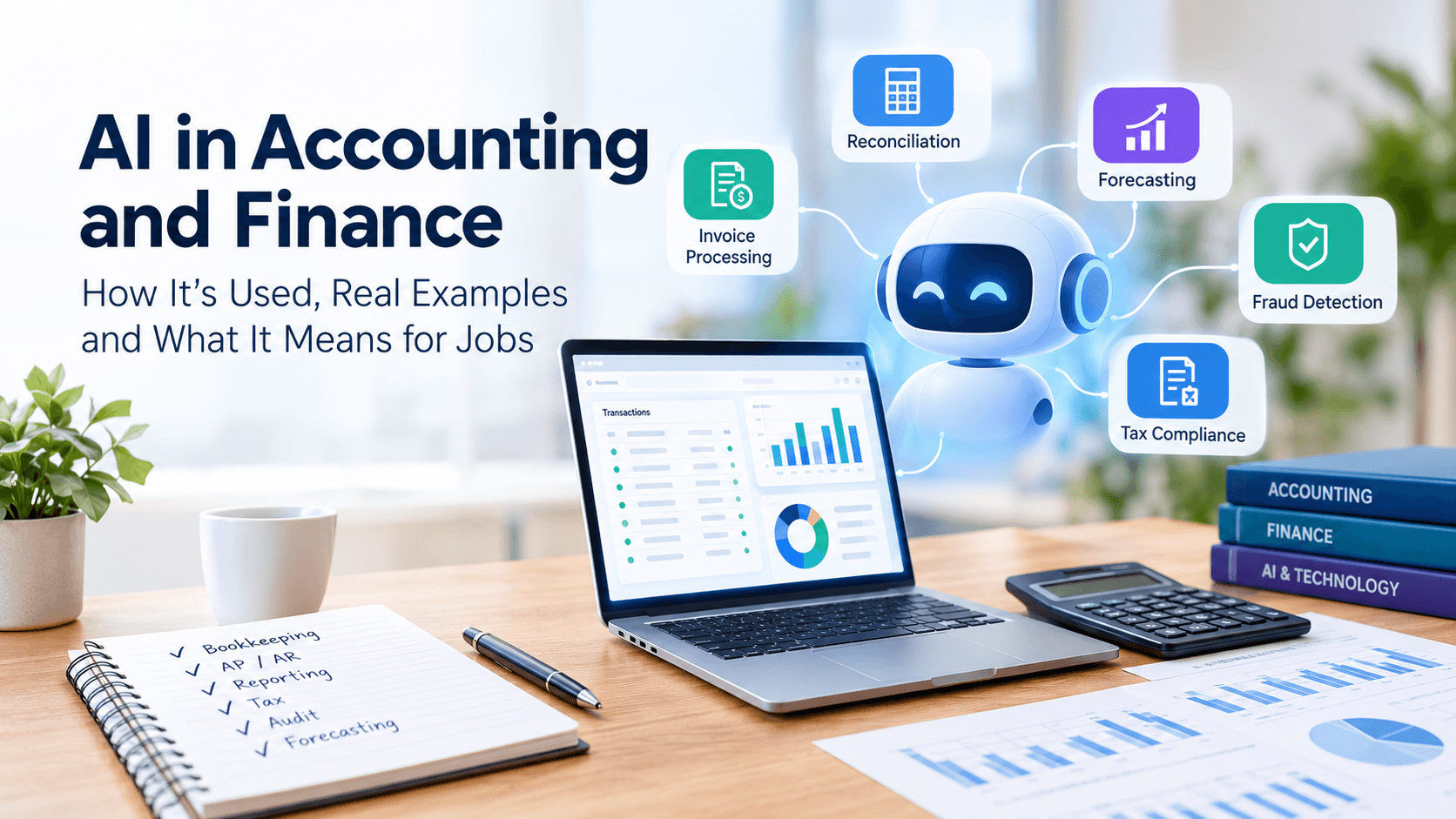
AI in accounting and finance is already part of everyday work. It reads invoices, suggests how to categorise transactions, matches records, drafts reports, and flags unusual numbers. It doesn’t remove the need for people to check that work, make judgment calls, and advise clients. The clearest job impact so far is in how accountants spend their time: less typing, more reviewing, explaining, and handling exceptions. How AI will reshape specific jobs over the long run is still less certain.
Whether you run a small business, work in finance, or are an accounting student wondering if you picked the right career, this guide explains in plain English what AI does in accounting and finance, real examples of where it’s used, the tools behind each task, what to check before trusting it, and what the research does and doesn’t tell us about jobs and day-to-day work. Next, we’ll start with what AI means in this context.
What Is AI in Accounting and Finance?
AI in accounting and finance refers to software that can recognise patterns in financial data, read documents and language, and make predictions or suggestions, rather than simply following fixed instructions. It handles repetitive, high-volume tasks so people can focus on work that requires judgment, client communication, and oversight.
AI vs Traditional Accounting Automation
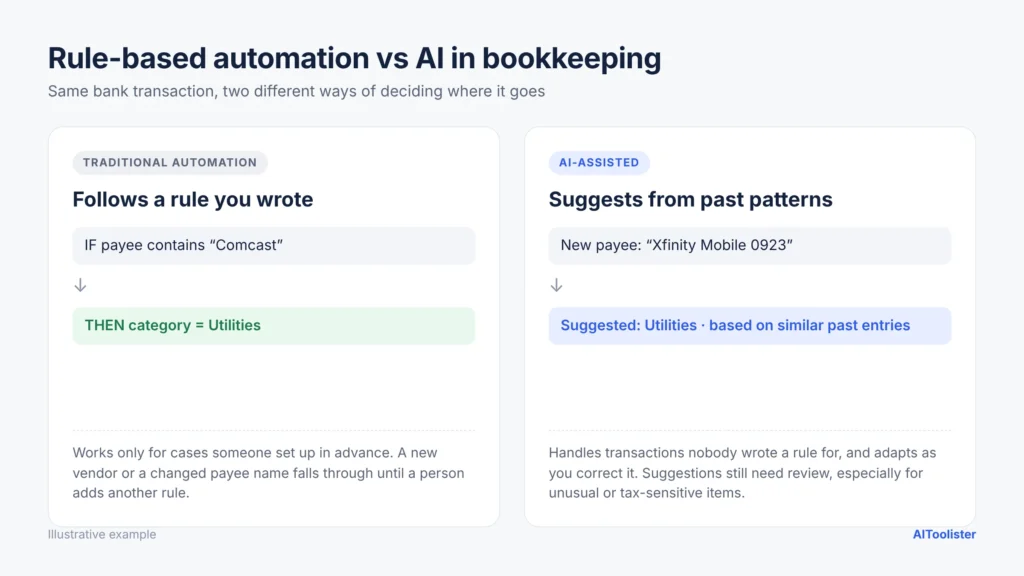
Accounting software has automated tasks for decades. A bank rule that says ‘anything from Comcast goes to Utilities’ is classic automation: it does the same thing every time. AI-based features work differently. They can suggest a category for a transaction they haven’t seen before, read an unfamiliar invoice layout, or flag a payment that looks unusual compared with past activity. That difference matters for the examples below, because it explains why some tasks are better suited to rules and others to AI.
In practice, the two overlap. Most accounting tools combine rules with AI models, and not every AI feature learns from your corrections automatically; some use pre-trained models that only change when the vendor updates them. That’s why it’s worth asking any provider how its AI works, and why its output still needs a human eye. With that distinction in mind, the next sections show where these tools are used.
The Main Types of AI Used in Accounting
- Machine learning: finds patterns in past data to suggest categories, match records and highlight unusual activity.
- Generative AI and chatbots: large language models (the technology behind tools like ChatGPT) that write, summarise, and answer questions, such as drafting a client email or explaining an accounting rule.
- Document AI: reads receipts, invoices, bank statements and contracts, then pulls out details like the vendor, date, amounts and line items.
- AI agents: newer systems that can carry out a multi-step task, such as moving an invoice from arrival to approval, and pass exceptions to a person.
How AI Is Changing Accounting and Finance
From Simple Rules to AI Agents
The shift has come in waves. First came rules-based automation: bank feeds, recurring entries and matching rules that saved time but struggled with anything unusual. Then machine learning let software suggest categories and spot patterns in past transactions. Since 2023, generative AI has added software that can read and write language, so it can summarise a contract, draft a variance explanation or answer a plain-English question about the numbers. Each step has changed what people do themselves and what they review. The next step is AI agents, which carry out a sequence of steps rather than just making a suggestion.
The newest step is AI agents, which carry out a sequence of steps rather than just making a suggestion. Adoption is still early: in the Thomson Reuters Institute’s 2026 survey of professional services organisations, 15% had adopted some type of agentic AI tool, and another 53% were planning for or considering them. This suggests interest is growing, but broad adoption is still developing. That means the job impact is still emerging, but it’s moving toward fewer manual handoffs and more oversight of automated work.
How Accounting Firms Are Using AI Today
Adoption has grown quickly, but the numbers depend on who’s being surveyed:
- Across professional services: In the Thomson Reuters Institute’s 2026 AI in Professional Services Report, a survey of 1,500+ professionals in legal, tax, accounting, risk and government work found that 40% said their organisations now use generative AI, up from 22% the year before. For accounting teams, that suggests AI is moving from experiment to everyday support for drafting, research and review.
- Among tax firms specifically: Thomson Reuters reports that about a third of tax firms are using generative AI in their work, and 14% are using agentic AI (Thomson Reuters Tax).
- Top uses: In its 2025 survey, the most common generative AI uses among tax and accounting professionals were tax research (77%), tax return preparation (63%) and tax advisory (62%) (Thomson Reuters press release). These are exactly the kinds of tasks where AI can reduce drafting time and let professionals focus more on judgment, exceptions, and client advice.
How AI Is Used in Accounting: Real Examples
The examples below show how the earlier concepts appear in day-to-day work.
Many accounting platforms now suggest categories for bank and card transactions based on patterns in your past entries. If you usually code a certain software subscription as “Office Expenses,” the software may start suggesting that. Some tools adapt as you correct them; others rely more on rules and pre-built models.
Accounts Payable and Invoice Processing
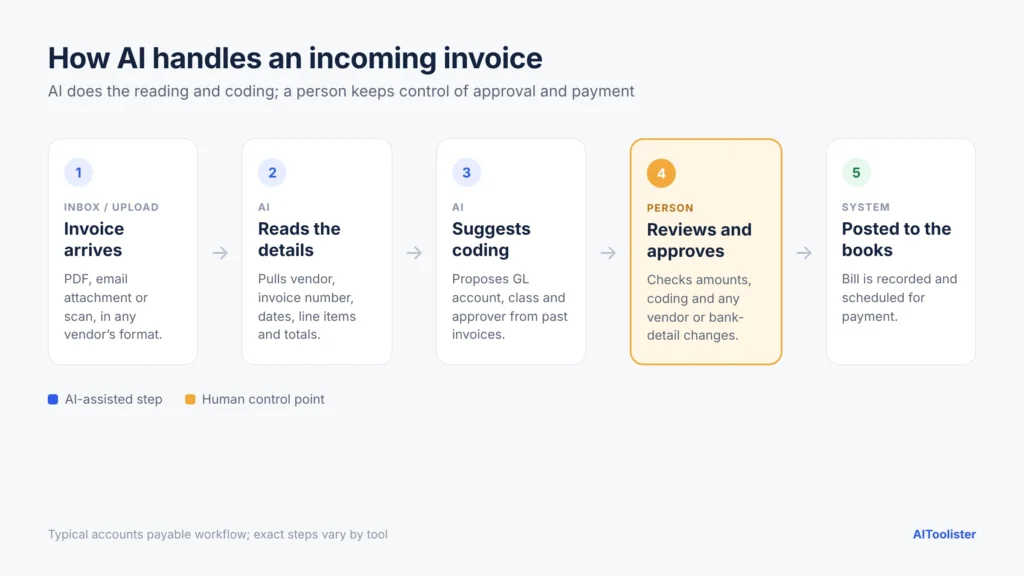
Invoices arrive as PDFs, photos and emails in every format imaginable. Document AI can read them, extract the vendor, amount, due date and line items, suggest an expense account and route the bill for approval. BILL, for example, says its AI reads incoming invoices and enters the data for your review, and warns you about possible duplicate invoices (BILL AI). A person still makes the approval and payment decision, so the role shifts from data entry to review and control.
Bank Reconciliation and Month-End Close
AI-assisted reconciliation can match many routine bank transactions to invoices, bills and payments, and highlight the ones that don’t fit. How much it matches depends heavily on how clean and consistent your data is. Someone still needs to investigate exceptions and sign off on the close, meaning less manual matching and more exception handling and review. That same pattern—automation first, human review second—shows up in the tax and audit examples that follow.
Tax Preparation and Research (US Examples)
In the US, AI tools can help pull data from tax documents such as W-2s and 1099s, flag possible deductions, and summarise tax rules during research. Tax research is one of the most common uses among tax professionals, as the Thomson Reuters figures above show. AI-generated tax answers can be wrong or out of date, so professionals should check them against official IRS guidance and have a qualified professional review them. In practice, AI can speed up research, but it does not replace professional judgment.
Audit and Compliance
Traditional audits test a sample of transactions. Audit analytics tools can now analyse much larger datasets. For instance, MindBridge says it risk-scores every transaction it receives, so auditors can focus on the riskiest entries (MindBridge FAQ). A high risk score isn’t a finding, though: auditors still decide what an anomaly means, apply professional scepticism, and form the audit opinion. The job shifts from manually checking fewer items to reviewing more data and interpreting more exceptions.
How AI Is Used in Finance
Accounting records what happened. Finance uses those numbers to plan what happens next, and AI is changing that side too. The examples below show how that shift affects analysis, forecasting, cash management, risk, and the kind of decisions finance teams spend time on. First, look at financial analysis and reporting.
Financial Analysis and Reporting
Generative AI can turn a set of numbers into a first draft of the story behind them: why expenses rose, which product line drove growth, what changed since last quarter. Finance teams use it to draft commentary and answer plain-English questions, then edit and verify the result rather than writing from scratch. That shifts some reporting work from drafting to reviewing, explaining, and adding context.
Forecasting and FP&A
Financial planning and analysis (FP&A) teams use machine learning to build forecasts that update as new data arrives, and to test “what if” scenarios, such as what happens to cash if a large customer pays late. Forecasts are only as good as the data behind them, and unusual events can still catch any model off guard. These tools change how analysts build and revise forecasts, but they also shift time toward interpreting results and explaining assumptions.
Cash Management and Treasury
AI can help estimate cash inflows and outflows by learning from customers’ payment habits and seasonal patterns. This supports decisions about when to pay bills, draw on credit, or hold cash, though the finance team makes the final call.
Fraud Detection and Risk
AI is good at flagging activity that doesn’t fit normal patterns: a duplicate invoice, a vendor whose bank details suddenly changed, or an expense claim that breaks the usual pattern. Flags are signals, not proof. Some will be false alarms, and some fraud won’t be flagged at all, so people still need to investigate and apply controls. That means the job impact is more review, investigation and follow-up, not less.
AI Tools for Accounting and Finance by Task (Free and Paid)
You don’tYou don’t need one giant AI system. Most businesses start with the AI already built into their accounting software and add a specialist tool only for their biggest bottleneck. Here are common examples by task, along with what a person should still check. These examples connect the tasks above to the tools below, starting with the most common use cases. These are examples, not endorsements. Features, plans and availability vary by plan and country and change often, so check each provider’s own site. For a product-by-product comparison with current pricing, see our separate guide to the best AI accounting software.
Free AI Tools for Accounting
You can start without spending anything. ChatGPT and Google Gemini both offer free versions with usage limits that can explain accounting concepts, help write spreadsheet formulas, and draft emails. Some accounting and spend tools also have free tiers, such as Zoho Books’ free plan for very small businesses (its free-plan AI features are limited) and Ramp’s free spend management. A free chatbot isn’t accounting software, though: it doesn’t keep your books.
Pros and Cons of AI in Accounting
Benefits of AI in Accounting
The most useful evidence so far comes from a working paper by Jung Ho Choi of Stanford Graduate School of Business and Chloe Xie of MIT Sloan. They surveyed 277 accountants and analysed field data from 79 small and mid-sized firms using AI-based accounting software. Among AI adopters, they documented:
- “A 55% increase in weekly client support” and a reallocation of “approximately 8.5% of accountant time from routine data entry toward high-value tasks such as business communication and quality assurance” (Stanford GSB working paper).
- Faster closes: Stanford reports that accountants who use AI “finalise monthly statements 7.5 days faster than those who use traditional methods” (Stanford GSB).
It’s an early, not-yet-peer-reviewed study of one software provider’s customers, so treat the numbers as promising evidence rather than a guarantee for every business. Other practical benefits include fewer manual typing errors when documents are read automatically, and earlier warnings about duplicates, unusual entries or cash shortfalls.
Risks and Limitations
- Confident mistakes. Generative AI can produce answers that sound right but are wrong, including made-up figures or outdated rules.
- Responsibility stays with people. If AI miscategorises an expense or misreads an invoice, the business and its professionals remain responsible for the numbers.
- Data security. Financial records are sensitive. Each provider handles data differently, so review its security documentation and confirm whether it uses your data to train AI models.
- Hard-to-explain results. Auditors, lenders and regulators may ask why a number is what it is. A tool that can’t show its reasoning makes that harder.
- Errors can slip past review. The same Stanford study reported early evidence of possibly AI-generated errors slipping through human-review processes, reminding us that review only works if it’s done properly.
What to Check Before Trusting AI With Accounting Work
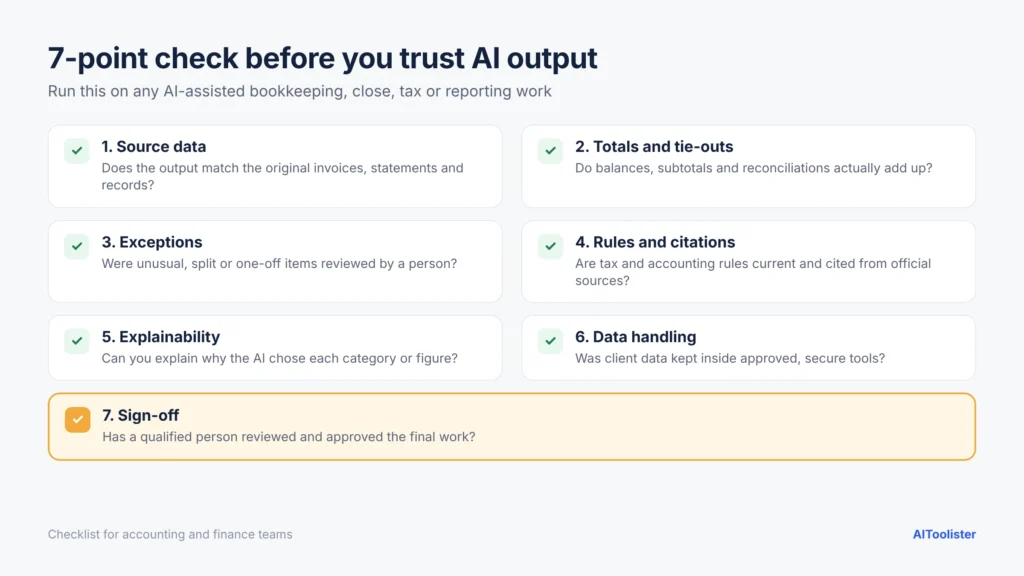
Before you rely on any AI output, run through this quick checklist:
- Source data: Is the AI working from complete, accurate bank feeds, documents and records?
- Totals and tie-outs: Do the AI’s numbers reconcile to bank statements, the trial balance or source documents?
- Exceptions: Have you reviewed everything the tool flagged, and spot-checked what it didn’t flag?
- Rules and citations: Are tax or accounting rules quoted from official, current sources, such as IRS guidance for US tax?
- Explainability: Can you explain how each number was produced if an auditor or client asks?
- Data handling: Is this tool approved for the data you’re giving it, and is that data kept out of model training if required?
- Sign-off: Has a qualified person reviewed and approved the final result?
Will AI Replace Accountants and CPAs?
We can say with confidence that AI is automating many accounting tasks. What it will do to specific jobs is less certain and will likely vary by role, firm size, and how quickly the technology improves.
Tasks AI Automates vs Work That Stays Human
AI handles repetitive, rules-heavy work well: data entry, categorising, matching, first drafts, and anomaly detection. It’s much weaker at work that depends on context, trust and accountability, such as interpreting tax law for a client’s situation, judging unusual transactions, explaining results to a business owner and standing behind the numbers.
That accountability is often formal. In the US, paid tax return preparers, including CPAs, enrolled agents, and attorneys, must sign the returns they prepare, and licensed CPA firms issue audit opinions on financial statements. Exact requirements depend on the role, the type of engagement and the state, and they differ in other countries.
What the Research and Job Data Say
The Stanford working paper described above found that AI made accountants more productive, not redundant, within the firms it studied. It’s early evidence, though, not a long-term forecast for the whole profession.
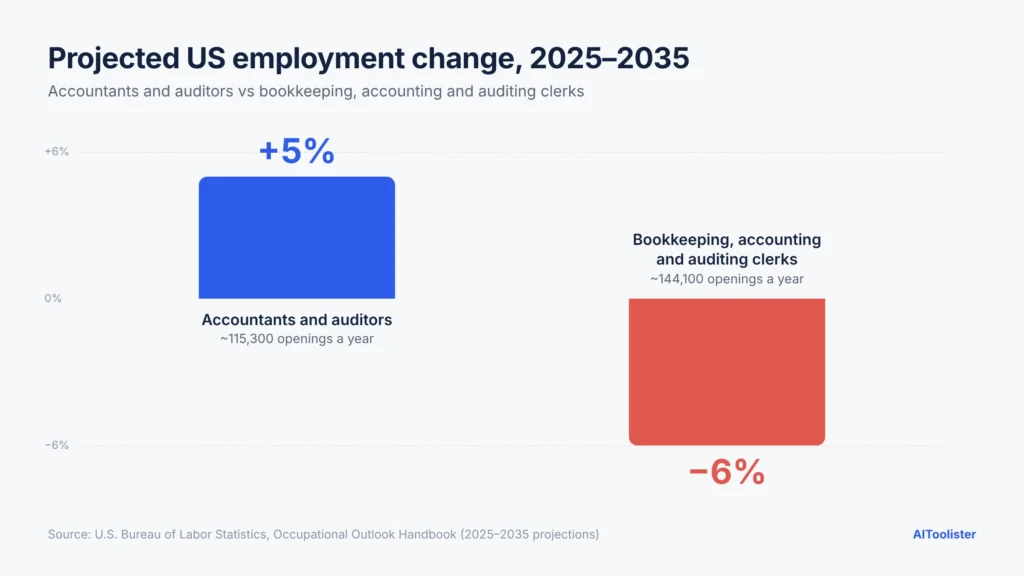
US government projections are also worth knowing. The Bureau of Labour Statistics projects accountant and auditor employment to grow 5% from 2025 to 2035, faster than the average for all occupations, with about 115,300 openings each year. Over the same period, it projects employment of bookkeeping, accounting and auditing clerks to decline 6%, though about 144,100 openings are still expected each year as workers retire or move to other jobs.
These are US projections, not guarantees, and they reflect many economic and workforce factors. BLS does connect both outlooks to technology, but in different ways: it expects software automation to reduce demand for clerks, while for accountants it expects AI and similar tools to automate routine tasks without reducing overall demand, making advisory and analytical work more prominent. Neither projection can tell you exactly how AI will affect a particular job.
What This Means for Entry-Level Accounting Jobs
If you’re a student, accounting is still a viable career, but your first job may look different from the one your professors started in. Expect less manual bookkeeping and more reviewing, investigating and explaining from early on, which makes fundamentals and judgment more important, not less.
AI in Accounting and Finance Jobs: Skills to Build Now
How Roles Are Shifting
As firms adopt AI, they need people who understand both accounting and the systems doing the work: setting up automation, keeping data clean, and reviewing and controlling AI-assisted processes. These roles still require solid accounting knowledge. The difference is that the accountant supervises and improves the process instead of doing every step by hand.
Skills That Matter Most
- Reviewing AI output. Knowing what “right” looks like, so you can catch the AI when it’s wrong.
- Data skills. Comfort with spreadsheets, clean data and basic analytics, because AI is only as good as the data it works from.
- Judgment and scepticism. Asking “does this make sense?” before a number reaches a client or regulator.
- Communication. Explaining what the numbers mean in plain language.
- Tool familiarity. Hands-on experience with the AI features in the software employers use.
Advice for Accounting Students
If you’re worried, you’re asking the right question. Keep building your accounting fundamentals, because you can’t review AI work without them. Then add practical AI experience: try free AI assistants on study tasks, learn how AI features work in common accounting software, and explore AI resources from professional bodies such as AICPA & CIMA; some resources may require membership or payment. Graduates who can do both will be easier to hire.
How to Start Using AI in Accounting and Finance
For Small Business Owners
Start with the AI already built into your accounting software, such as suggested categories and receipt capture, and review what it does each month before trusting it more. If you’re looking beyond accounting, our guide to the best AI tools for business covers marketing, customer service and automation tools.
For Accounting Firms
Pick one high-volume task, such as invoice processing or reconciliation, and pilot AI on it with a clear before-and-after measure. Write a simple AI policy covering which tools staff may use and what client data can go into them. Many firms still lack one: in Thomson Reuters’ 2025 report, 70% of tax firms said they had no policies guiding generative AI use (Thomson Reuters Tax).
For Individual Accountants and Finance Professionals
Start with a general AI assistant for low-risk tasks, such as drafting emails, explaining standards, or building spreadsheet formulas. Learn the AI features in the software your employer uses, and use the checklist above before AI output leaves your desk.
AI in Accounting and Finance FAQs
What is the 30% rule for AI?
It’s an informal rule of thumb, not an official standard. It’s usually described as AI handling about 70% of repetitive work while people keep about 30% for oversight and judgment, though the meaning varies by context. In accounting, the practical lesson is to let AI handle routine work while people remain responsible for review and decisions.
Will AI replace accountants in 2026?
AI is automating many accounting tasks, but current evidence doesn’t show it replacing the profession. US projections still show growth for accountants and auditors, while routine clerical roles face more pressure. Long-term effects on specific roles remain uncertain.
How is AI being used in accounting?
Common uses include suggesting transaction categories, reading invoices and receipts, matching bank transactions, supporting tax research and preparation, and analysing audit data for unusual entries. In finance, it also supports forecasting, cash planning and fraud detection.
Is there free AI for accounting?
Yes, with limits. ChatGPT and Google Gemini have free versions that help with explanations, spreadsheets and drafting, and some accounting and spend tools offer free plans. Full bookkeeping software is usually paid.
Can ChatGPT do accounting?
It can help with accounting tasks, such as explaining standards, drafting memos or writing formulas, but it isn’t accounting software. It doesn’t keep a ledger and can make confident mistakes with numbers and rules.
Is it safe to use AI with financial data?
It depends on the tool. Use business-grade software, check each provider’s security documentation and data-use policy, and avoid putting client or company financial records into personal chatbot accounts.
Conclusion
AI in accounting and finance is already reading invoices, matching transactions and drafting reports in firms of every size. Early evidence points to a profession that’s changing shape: less typing, more reviewing, explaining, and advising. How far that shift goes for specific roles is still unfolding.
If you run a business, start with the AI already in your accounting software. If you work in finance, learn to check and question AI output. And if you’re a student, keep your fundamentals strong and add AI skills, because employers are looking for that combination.
Keep Exploring