
Gencraft
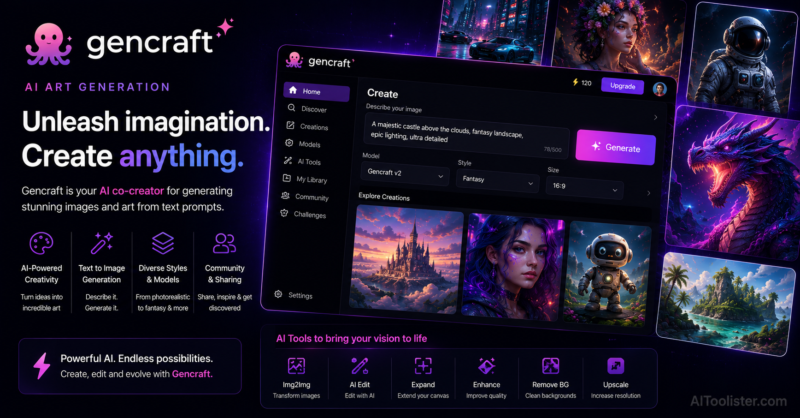
In this Gencraft Review, we explore how this AI-powered image generation platform helps creators produce stunning artwork, realistic images, and creative visuals from simple text prompts in seconds.
I remember when creating visual content meant either learning Photoshop, hiring a designer, or settling for stock images that looked exactly like everyone else’s stock images. AI image generation changed that, but most of the tools that emerged from it were desktop-first experiences with interfaces that felt like they were designed for people who already knew what they were doing. Gencraft took a different approach — building for the phone first, for the casual creator first, for the person who just wants to see their idea visualized without reading a manual first.
Gencraft is a mobile-first AI art and video generation platform that lets you create images and short videos from text prompts directly from your phone or browser. It’s fast, it’s accessible, and it doesn’t require you to understand how diffusion models work before you can get something worth sharing out of it. For social media creators, students, hobbyists, and anyone exploring what AI can do with a creative idea, that low barrier is the whole point.
If you’re experimenting with different artistic styles and AI-generated visuals, our Best Free AI Image Generators in 2026 guide compares Gencraft with other tools that help turn creative ideas into unique artwork.
The mobile execution is where Gencraft earns its differentiation. I’ve used plenty of AI image tools that technically have a mobile version — and you can tell. The interface was designed for a monitor and then shrunk down to fit a phone screen, and the experience shows. Gencraft was built the other way around. The workflow fits how you actually use a phone — quick inputs, fast results, immediate sharing — rather than demanding desktop habits from a device that doesn’t support them naturally.
The video generation is what genuinely surprised me when I first used it. Producing short animated clips from a text prompt, directly from a mobile device, without touching a timeline or installing editing software — that capability feels more significant than it sounds in a category where most accessible tools stop at static images. For social content where video consistently outperforms stills, having that option available from the same app you’re already using for images removes a workflow step that most creators skip because it’s too complicated.
The style library covers enough aesthetic ground — photorealistic, anime, fantasy, cinematic, abstract — that most casual creators can find a direction that matches what they’re going for without needing to describe it in exhaustive detail. Point in a direction, add a prompt, and the output lands somewhere in the right neighborhood reliably enough for social media and personal creative work.
If you’re looking for AI tools to create stunning visuals, it’s worth exploring our AI Image category to compare platforms for digital art, illustrations, concept design, marketing graphics, and creative projects.
Gencraft Review: Key Features
- Mobile-first AI image generation from text prompts on iOS and Android
- Short video generation from text descriptions without editing software or timeline tools
- Wide style library covering photorealistic, anime, fantasy, abstract, and cinematic aesthetics
- Community feed for browsing other users’ creations and drawing prompt inspiration
- Style transfer for applying aesthetic direction to uploaded reference images
- Prompt history for revisiting and iterating on previous generation inputs
- Fast generation times optimized for mobile use and social content workflows
- Direct sharing to social media platforms from within the app
- Regular model updates improving output quality across style categories
- Browser-based access alongside mobile apps for flexible cross-device use
Gencraft Pros
In this Gencraft Review, these are the biggest advantages we found after evaluating its AI-powered image generation, artistic style customization, text-to-image creation, prompt enhancement, and creative design capabilities.
- Mobile-first design actually reflects how casual creators work rather than adapting a desktop tool for a smaller screen
- Video generation from text prompts fills a real gap for social creators who want motion content without editing complexity
- Style library gives enough directional control without demanding advanced prompting knowledge to use effectively
- Fast generation speeds keep creative momentum going without frustrating wait times between ideas
- Community feed provides ongoing prompt inspiration for users still learning what descriptions produce what results
Gencraft Cons
- Output quality on complex or detailed prompts trails professional desktop tools noticeably
- Video generation length and complexity are limited compared to dedicated AI video platforms
- Advanced features and ad-free experience require a paid subscription
Best For
Mobile-native creators, social media content producers, students, hobbyist artists, and casual users who want fast, accessible AI image and video generation from their phone without the learning curve or complexity that professional creative tools bring with them.
Use Cases
Social media visual content, short video creation, creative style exploration, mobile art generation, prompt experimentation, community creative challenges, quick concept visualization, and accessible AI art for users without design backgrounds or desktop creative software experience.
Gencraft Pricing
- Free plan with daily generation limits and ads
- Pro plan for higher generation volume and ad-free experience
- Premium plan for maximum access and priority generation speeds
Things to Consider Before Using Gencraft
Gencraft is built for speed and accessibility, not precision and control. If you need highly specific output — exact compositions, particular lighting, detailed character consistency across multiple images — you’ll hit the ceiling of what the platform can deliver fairly quickly. It’s the right tool for casual exploration and social content, not for professional creative projects where output quality has to hold up under scrutiny. The free plan is functional enough to get a real sense of what the tool does before committing to anything, which is the right way to approach it before deciding whether the Pro tier is worth it for your use case.
AIToolister Verdict on Gencraft
Overall, this Gencraft Review shows that the platform is an excellent solution for designers, marketers, artists, content creators, and businesses looking to create high-quality AI-generated images quickly and efficiently. Gencraft does what it sets out to do — and it does it on the device most people actually have in their hand when a creative idea strikes. The mobile-first execution is genuine rather than performative, the video generation adds real value beyond what image-only tools offer at this accessibility level, and the style variety is broad enough that most casual creators will find something that works for what they’re trying to make. It’s not competing with Midjourney or Leonardo for professional output quality, and it doesn’t need to. It’s competing for the creator who wants to make something visual right now, on their phone, without a tutorial. In that category, it’s one of the better options I’ve used.
Official Gencraft Website
Visit the official Gencraft website to explore its AI-powered image generation platform, compare available plans, and discover tools for creating unique artwork, illustrations, and digital designs.
Frequently Asked Questions
What is Gencraft used for?
Gencraft is an AI-powered image generation platform that creates artwork, illustrations, digital designs, and realistic images from text prompts in just a few seconds.
How does Gencraft generate AI images?
Gencraft uses advanced generative AI models to interpret text prompts and produce original images in multiple artistic styles, including realistic, fantasy, anime, and digital art.
Who should use Gencraft?
Gencraft is ideal for graphic designers, digital artists, marketers, content creators, social media managers, bloggers, and businesses that need high-quality visual content.
Can Gencraft create images in different art styles?
Yes. Gencraft supports a wide variety of artistic styles, allowing users to generate images ranging from photorealistic scenes to fantasy art, cartoons, watercolor, anime, and more.
Is Gencraft worth it?
Gencraft is worth considering for anyone looking for an easy-to-use AI image generator that produces creative, high-quality visuals quickly without requiring advanced design skills.