
Playground AI
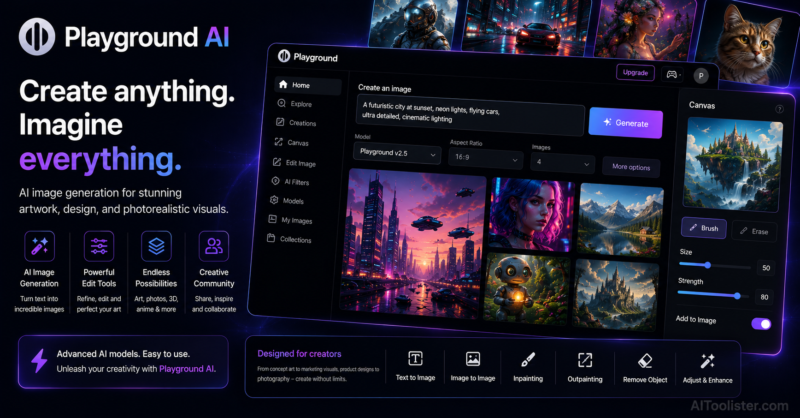
In this Playground AI Review, we explore how this AI-powered image generation platform helps creators design realistic images, digital artwork, illustrations, and marketing visuals using simple text prompts.
Most people who get into AI image generation start with one of the big names — Midjourney, DALL-E, Stable Diffusion — and somewhere along the way discover that what they actually want is more control over the output without having to become a prompt engineer to get it. Playground AI sits in that space. It’s where people land when they’ve outgrown the simplest tools but don’t want the complexity ceiling that comes with running local models or learning a full ComfyUI workflow.
Playground AI is a browser-based AI image generation and editing platform that gives creators meaningful control over the generation process — through model selection, fine-tuned style options, image editing tools, and a canvas workspace that goes beyond single-image output into something closer to a full creative environment. It’s free to use at a meaningful level, which matters in a category where the tools worth using usually cost something before you can tell if they’re right for you.
If you’re creating everything from social media graphics to detailed digital artwork, our Best Free AI Image Generators in 2026 guide explains how Playground AI compares with other leading image generation platforms.
The canvas is what I keep coming back to. Rather than generating one image, downloading it, and moving on, Playground lets you work within a persistent canvas — generating, editing, combining, and extending images in the same space. That workflow feels closer to how creative work actually happens — iterative, layered, building toward something rather than producing outputs in isolation and hoping they add up to what you had in mind.
The model variety is genuinely useful for creators who work across different visual contexts. Playground offers access to multiple generation models — including Stable Diffusion variants and its own Playground v2 model — each with different strengths across photorealism, illustration, graphic design, and artistic styles. Matching the model to the project rather than forcing everything through a single engine produces better results with less prompting effort.
The image editing tools — inpainting, outpainting, background removal, and image mixing — bring post-generation refinement into the platform rather than requiring external tools for every adjustment. For creators who want to fix, extend, or combine generated images without learning Photoshop, having those capabilities in the same interface keeps the creative flow intact.
The free tier is generous enough that you can genuinely evaluate whether Playground fits your workflow before spending anything, which is increasingly rare in the AI creative tools space.
If you’re exploring AI-powered creative design tools, it’s worth browsing our AI Image category to compare platforms for generating illustrations, marketing visuals, concept art, and professional-quality images.
Playground AI Review: Key Features
- Browser-based canvas workspace for iterative multi-image creative workflows
- Multiple AI generation models including Stable Diffusion variants and Playground v2
- Inpainting for editing specific areas within generated images without regenerating entirely
- Outpainting for extending image boundaries beyond the original frame
- Image mixing for combining multiple generation inputs into a single output
- Background removal and replacement within the platform
- Style presets for quickly directing output aesthetic without complex prompting
- Negative prompting for excluding unwanted elements from generated images
- Real-time generation mode for instant visual feedback as prompts are adjusted
- Community feed for browsing publicly shared creations and discovering prompting techniques
Playground AI Pros
In this Playground AI Review, these are the biggest advantages we found after evaluating its AI-powered image generation, text-to-image creation, image editing, prompt customization, and creative design capabilities.
- Canvas workspace supports iterative creative work rather than one-off image generation
- Multiple model access gives creators flexibility across different visual styles and output types
- Generous free tier makes meaningful evaluation possible before any financial commitment
- Inpainting and outpainting tools bring useful post-generation editing into the same platform
- Real-time generation gives immediate feedback that makes prompt refinement considerably faster
Playground AI Cons
- Output quality on the free tier is limited by daily image caps that run out faster than expected
- Canvas workflow has a learning curve for users coming from simpler prompt-and-download tools
- Photorealistic human portraiture remains inconsistent compared to dedicated portrait generation tools
Best For
Digital artists, graphic designers, content creators, and AI art enthusiasts who want meaningful creative control and an iterative canvas workflow without the complexity of local model deployment or the cost barrier of premium-only platforms.
Use Cases
Digital illustration, concept art exploration, social media visual content, graphic design assets, background generation and extension, image mixing and compositing, style experimentation, marketing imagery, and iterative creative development across multiple generation layers in a single canvas session.
Playground AI Pricing
- Free plan with daily image generation limit
- Starter plan for higher daily image volume
- Pro plan for maximum generation capacity and priority access
- Team plan for collaborative creative workflows
Things to Consider Before Using Playground AI
Playground AI rewards the creators who take time to understand how the different models behave rather than treating them as interchangeable. The same prompt fed through different models produces meaningfully different output — and knowing which model suits which kind of project is what separates getting lucky occasionally from producing consistent results. The canvas workflow is genuinely powerful but takes adjustment if you’re used to tools that work on one image at a time. Give yourself a session or two to get comfortable with how it works before deciding whether it fits your creative process.
AIToolister Verdict on Playground AI
Overall, this Playground AI Review shows that the platform is an excellent solution for designers, marketers, artists, content creators, and businesses looking to generate high-quality AI images and edit visuals quickly with minimal effort. Playground AI occupies a genuinely useful position in the AI image generation landscape — more capable and more flexible than the purely accessible beginner tools, less intimidating and less expensive than the professional platforms that assume significant prior knowledge. The canvas workflow, the model variety, and the editing tools work together in a way that supports real creative development rather than just output production. For creators who want to actually make things rather than just generate images and hope one lands well, Playground gives the control and the environment to do that without a steep entry cost. It’s one of the tools I’d recommend trying early in any AI art exploration, precisely because the free tier is honest about what the platform can do.
Official Playground AI Website
Visit the official Playground AI website to explore its AI-powered image generation platform, compare available plans, and discover tools for creating artwork, marketing graphics, and professional visuals.
Frequently Asked Questions
What is Playground AI used for?
Playground AI is an AI-powered image generation platform that creates artwork, illustrations, marketing graphics, product images, and realistic visuals from text prompts.
Can Playground AI edit existing images?
Yes. Playground AI allows users to edit images, remove or replace objects, expand scenes, apply inpainting, and generate creative variations using AI.
Who should use Playground AI?
Playground AI is ideal for graphic designers, marketers, digital artists, content creators, social media managers, bloggers, and businesses that need professional-quality visuals.
Which AI models does Playground AI support?
Playground AI supports several popular image generation models, allowing users to create images in different artistic styles and levels of realism depending on their creative needs.
Is Playground AI worth it?
Playground AI is worth considering for anyone looking for a versatile AI image generator that combines text-to-image creation, image editing, and creative design tools in one easy-to-use platform.