Ahsan Javaid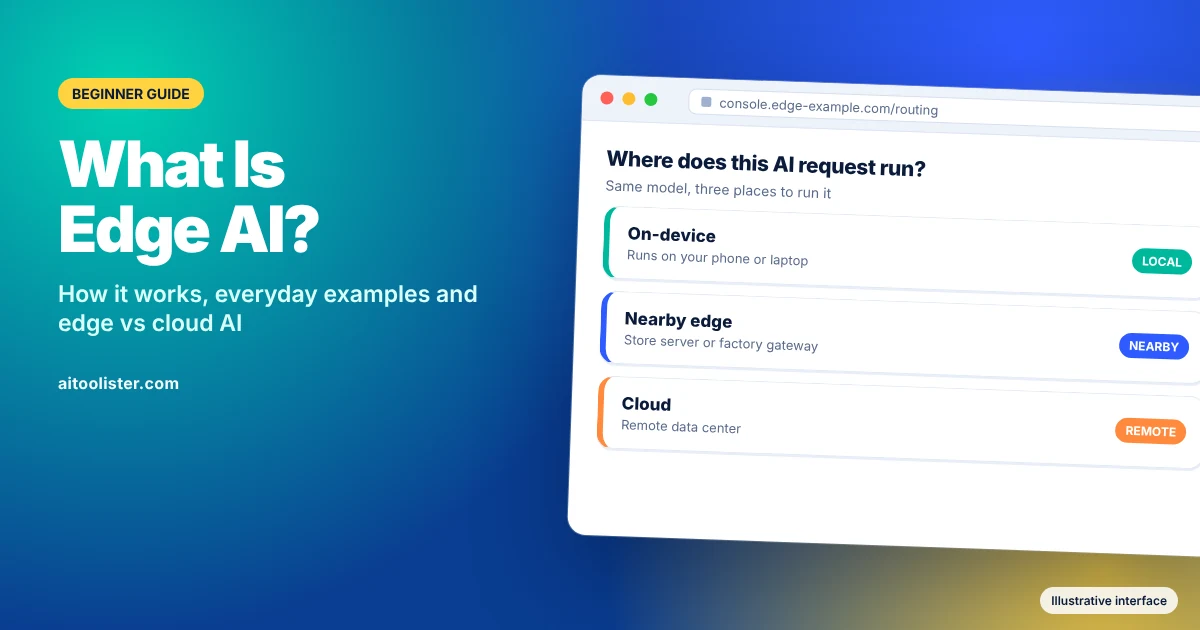
Edge AI means running an artificial intelligence model on the device that collects the data, or on nearby hardware, instead of sending the data to a distant data centre. A compatible phone, such as a recent Google Pixel, that summarises a voice recording without uploading it is using edge AI. So is a laptop that translates live captions with no internet connection.
The “edge” is the edge of the network: the phones, laptops, cars, cameras and sensors where data is created. NVIDIA describes edge AI as deploying AI applications in devices throughout the physical world, with computing done near the user rather than in a central cloud.
Edge AI is becoming common because phones and laptops now ship with AI-ready chips, often called neural processing units (NPUs). Many everyday AI features are hybrid: part runs on your device, and part runs in the cloud. This guide explains the difference and shows which features fall where.
Product examples checked October 28, 2026.
How Edge AI Works
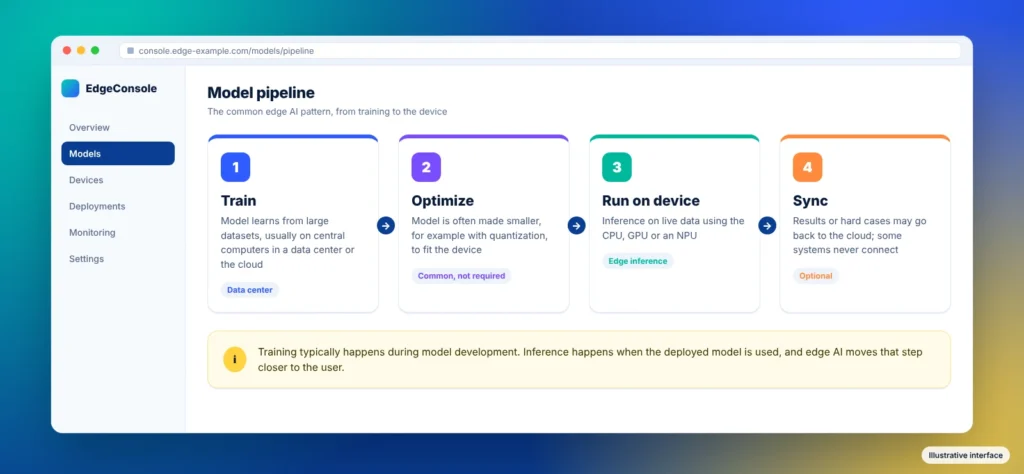
Most edge AI systems follow a similar pattern, although not every system uses every step.
- Training. A model learns from large amounts of data. This usually happens on powerful central computers, often in a data centre or the cloud.
- Optimization. The trained model is often made smaller and lighter so it fits a device’s memory and power budget. A common technique is quantisation, which stores the model’s numbers at lower precision. Many edge deployments do this, but it isn’t required in every case.
- Inference on the device. The model runs on the device and makes predictions from live data: a voice clip, a camera frame, a sensor reading. It can use the main processor, the graphics chip or a dedicated NPU.
- Syncing (optional). Some systems send results, summaries or difficult cases back to the cloud to improve the model. Others never connect at all.
Training typically happens during model development, while inference occurs when the deployed model is used. Edge AI mainly moves that second part, inference, closer to the person or machine that needs the answer.
Edge AI vs Cloud AI: Key Differences
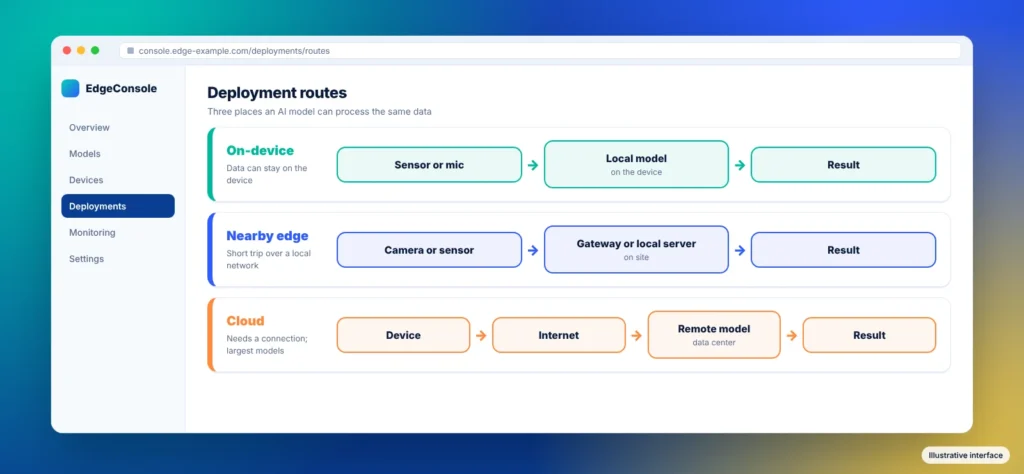
Edge AI describes where AI computation happens, not a separate category of intelligence. The useful comparison is edge AI versus cloud AI: processing on or near the data source versus processing in a remote data centre.
| Factor | Edge AI | Cloud AI |
| Where it runs | On or near the device | Remote data centers |
| Speed (latency) | Avoids a distant-cloud round trip; total speed depends on the model and hardware | Depends on the connection |
| Internet needed | Not for fully local tasks | Yes |
| Privacy | Data can stay on the device | Data leaves the device |
| Model size and power | Limited by the device’s hardware | Very large models are possible |
| Cost model | Hardware, software, power, maintenance and fleet-management costs | Hosted-service, infrastructure or usage costs; sometimes bundled into a product |
| Best for | Quick, private or offline tasks | Complex reasoning and large generation tasks |
Neither side wins on every row. Edge AI isn’t automatically more private, cheaper, or more energy-efficient; it depends on how a product is built and how much data it still sends. Cloud AI can run far larger models than any phone, so complex requests often go to servers.
Many of the consumer products discussed here combine local and cloud processing. Apple, for example, says many Apple Intelligence tasks run entirely on the device, while more complex requests go to Private Cloud Compute, its server-based system.
Cloud AI also has a physical footprint: data centres use electricity, and many use water for cooling. Our guide to how much water AI uses per prompt explains what the published estimates measure.
Edge AI vs On-Device AI: Are They the Same?
On-device AI is the most local form of edge AI: the model runs on the gadget itself, such as your phone, laptop or watch. Edge AI is the broader term and also covers hardware near the device, not inside it, such as a store’s local server or a gateway on a factory floor.
So every on-device AI feature is edge AI, but not every edge AI system is on-device. In consumer marketing, “edge AI” and “on-device AI” often overlap. Even so, neither label alone guarantees that a product never connects to the cloud or uploads data.
Edge AI Examples You Already Use
You probably already carry edge AI in your pocket. The examples below are labelled by where the work actually happens, based on each maker’s own documentation. Still, a device having an AI chip does not, by itself, prove that a feature runs locally. Offline operation may still require an initial download, setup or update, and availability varies by device, language and region.
Smartphones
- Google Pixel (on-device). Google says its Gemini Nano model runs features such as Recorder summaries, Call Notes, Pixel Screenshots and scam detection during calls on the phone itself. It also says several of these features work without a network connection. The newest Gemini Nano capabilities need a Pixel 9 or later.
- Apple iPhone (hybrid). Apple Intelligence runs many models on the device, such as the one that decides which notifications are priority. More complex requests go to Private Cloud Compute; Apple’s current privacy documentation lists Image Playground generation as an example of a request that can use it. Apple says it does not store data processed there or make it accessible to Apple.
- Samsung Galaxy (hybrid by default). Samsung says Galaxy AI processes data both on the device and in the cloud. Through its Knox management tools, Samsung documents a setting that restricts processing to the device, which limits cloud-dependent features.
AI PCs
Copilot+ PCs are Windows laptops with an NPU rated at 40+ trillion operations per second (TOPS). Microsoft says Live Captions with real-time translation, Windows Studio Effects (such as background blur and automatic framing on video calls), and Recall, which Microsoft labels a preview, run locally and don’t need the internet. Cocreator in Paint also uses the NPU, but Microsoft says it still needs an internet connection for cloud services that support responsible AI use. That makes it hybrid.
Smart speakers
Amazon Echo (local wake word, cloud requests). By default, Amazon says Echo devices detect the wake word locally. After the wake word activates it, a button or supported interaction mode sends the request audio to Amazon’s cloud. In March 2025, Amazon also ended an optional setting that let a few Echo models process some voice requests locally, according to TechCrunch. Echo voice-assistant requests are primarily processed in the cloud, with local components such as wake-word detection.
Cars
Driver assistance (onboard). Driver-assistance and self-driving systems are a classic edge AI case. They have to react to the road in real time, so the model runs on the vehicle’s own computer rather than waiting on a network, as NVIDIA’s explainer describes.
Wearables
Apple Watch (on the watch). Apple says Apple Watch Series 9 and Ultra 2 introduced the double-tap gesture, using the S9 chip’s Neural Engine to process data from the accelerometer, gyroscope and optical heart sensor with a machine-learning algorithm.
How Businesses Use Edge AI
Businesses use edge AI when decisions must be fast, connections are unreliable, or sending all raw data to the cloud is impractical. Examples of potential and deployed edge AI workflows include:
- Manufacturing: sensors on equipment can flag unusual readings early, so repairs happen before a breakdown, and cameras can spot defects on a production line.
- Retail: in-store cameras and sensors can track shelf stock or support checkout without streaming every video frame to a data centre.
- Healthcare: monitoring devices can analyse readings locally and alert staff only when something changes.
- Agriculture and logistics: sensors and drones in fields, warehouses, or vehicles can keep working where internet connections are weak.
Advantages of Edge AI
Edge AI benefits come from processing data close to where it’s created.
- Speed. Reducing communication delays can support responsive, real-time applications, such as live caption translation on a Copilot+ PC.
- Offline use. Fully local features keep working without a connection, as several of Google’s Pixel features do.
- Privacy potential. Data can stay on the device. Samsung, for example, documents an on-device-only control for Galaxy AI, though the privacy benefit depends on the product.
- Less data sent over the network. A camera or sensor can send a short alert instead of streaming everything it records.
- Potentially lower recurring inference costs for suitable workloads. Running a model on hardware you already own can reduce ongoing cloud fees. Hardware, maintenance, software updates and other operating costs still matter.
Downsides and Limits of Edge AI
The main downside of edge AI is that a phone, laptop or sensor has far less computing power than a data centre. That limit leads to several trade-offs:
- Smaller, less capable models. Device models must fit within limited memory, so Apple sends more complex requests to Private Cloud Compute.
- Battery drain and heat. Running AI locally uses power, which matters on phones, wearables and battery-powered sensors.
- Hardware and compatibility requirements. Some consumer features require recent chips or specific devices, such as a Pixel 9 for the latest Gemini Nano capabilities or a Copilot+ PC for Microsoft’s NPU features. Other edge models can run on existing CPUs, GPUs or embedded hardware, depending on their requirements.
- Harder updates. Improving a model means updating every device that runs it, not one server.
- Physical security. A device can be lost, stolen or tampered with, so the data and model on it need protecting.
Cloud AI is often the better fit for large generation tasks and access to the largest models.
Is Edge AI the Future?
Edge AI is not replacing the cloud. The products described above follow a hybrid model: quick, private tasks run on the device, and heavier requests go to servers. Apple and Samsung design their AI features the same way.
AI agents, which take a goal and work through the steps to complete it, can follow the same hybrid pattern. Our guide to AI agents explains how they work.
Frequently Asked Questions
Is edge AI safe?
Edge AI can reduce privacy risk because data can stay on the device instead of travelling to a server. It also shifts some risk to the device itself, which can be lost, stolen or tampered with. A feature’s safety depends on the product’s design, including how much data it still sends to the cloud.
How much does edge AI cost?
For consumers, the features discussed here are bundled into compatible devices or operating systems; edge AI doesn’t have a single standard pricing model. For businesses, cost depends on hardware, the number of devices, installation, maintenance, and software updates, weighed against the cloud fees it may replace. There is no single price, because these factors vary widely by project.
Does edge AI need the internet?
Not for fully local tasks. Google says several Pixel features powered by Gemini Nano work without a network connection. Hybrid features still need the internet for their cloud part, which is why Microsoft says Cocreator in Paint requires a connection even though it uses the NPU.
Is ChatGPT edge AI?
Not in its standard form. The standard ChatGPT app primarily uses cloud-based AI processing on OpenAI’s servers. Some smaller AI models can run locally on capable laptops, but that is separate from using the ChatGPT app. For a comparison of two leading cloud assistants, see our guide to ChatGPT vs Claude.
What is an edge device?
An edge device is any device that collects and processes data near where it is created. Phones, laptops, smart speakers, cameras, cars, industrial sensors and network gateways can all be edge devices.
Sources
- NVIDIA: What Is Edge AI and How Does It Work?
- Apple: Apple Intelligence & Privacy
- Google Store: Gemini Nano on Pixel
- Samsung Knox: Data processing for Galaxy AI
- Microsoft: Copilot+ PCs
- Microsoft Learn: Copilot+ PCs and NPU devices
- Amazon: Alexa, Echo Devices and Your Privacy
- TechCrunch: Amazon’s Echo will send all voice recordings to the cloud starting March 28
- Apple Newsroom: Apple Watch double tap gesture
Keep Exploring