Ahsan Javaid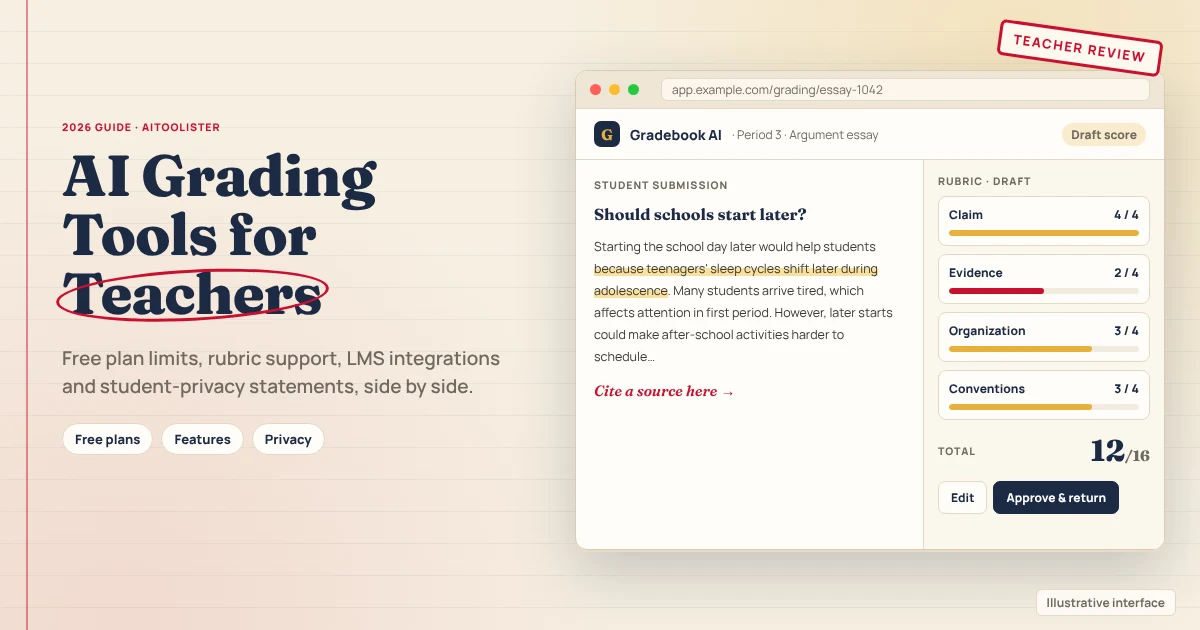
The best AI grading tool depends on what you grade. If you grade essays and open-ended work, CoGrader and EssayGrader are the closest fit. If you need maths and handwritten assignments, GradeWithAI is the clearer choice. If you handle paper exams, problem sets, or code, Gradescope is the better match. If you want rubric-based feedback, compare Brisk and MagicSchool.
One caveat matters more than any feature list: research shows AI scores can differ from teachers’ scores, so teachers should use these tools as a first pass to review, not as the final grader. This comparison uses each tool’s official pricing, product and privacy pages, checked on 27 October 2026. We didn’t test the tools hands-on, and privacy claims are the vendors’ own statements.
The Best AI Grading Tools at a Glance
| Tool | Best use case | Free access | Rubric support | Integrations | Paid from |
| CoGrader | Essays and open-ended work, including photos of handwriting | Free Starter plan: 150 student submissions a month | Your own rubric or 500+ state-standard rubrics | Google Classroom on all plans; Canvas and Schoology may need a school plan | $15/mo billed annually, or $19 monthly |
| EssayGrader | Essays, short answers, DBQs, research reports | Free Basic plan: 100 essays a month, up to 1,000 words each | Upload or create your own rubric; rubric library, with 800+ aligned rubrics listed for Pro | Google Classroom, Canvas, Schoology | $14.99/mo (Pro; billing basis not stated) |
| GradeWithAI | Essays, tests, maths and handwritten work | Free plan: 25 graded submissions every 30 days | Rubric generator included | Google Classroom, Canvas, Google Forms | $20/mo or $120/yr |
| Gradescope | Paper exams, problem sets and code | Free access mentioned; tier details not verified | Flexible scoring rubrics; group application | Not named on the pages checked | Pricing quoted by institution; AI-assisted grading needs the Institutional licence |
| Brisk | Feedback; rubric scoring listed (plan availability unclear) | Free Forever plan | Rubric-criteria feedback | Chrome extension for Google Docs, Classroom, Canvas, Schoology | School pricing on request |
| MagicSchool | Batch writing feedback | Free plan includes Class Writing Feedback | Based on your rubric | Clever, ClassLink, Canvas, Schoology on Enterprise only | $8.33/mo billed annually, or $12.99 monthly |
How We Compared These Tools
We used only each provider’s own pricing, product, help and privacy pages. For every tool, we recorded what kind of work it handles, its exact free limits, rubric support, documented integrations, privacy statements and current price.
Three rules shaped the comparison:
- Free plans are listed as exact limits and kept separate from trials.
- Privacy claims are quoted as vendor statements. A company saying it’s “FERPA compliant” isn’t an independent certification.
- “Not stated” means the pages we checked didn’t say, not that a tool fails on that point.
We left out tools whose current plans we couldn’t verify, including GPTZero’s AI grader, Marking.ai and GradingPal.
The Best AI Grading Tools for Teachers
CoGrader
Best for: teachers who grade essays and open-ended responses with their own rubric.
CoGrader grades “essays and open-ended work with rubric-based AI feedback,” and you can upload PDFs, Word files or photos of handwriting. You can use your own rubric, choose from more than 500 state-standard rubrics or build one with its rubric generator. CoGrader says “teachers still review every score and comment before students see it.”
Free plan: The Starter plan is free for teachers and includes 150 student submissions per month, according to its pricing page and homepage.
Integrations: CoGrader’s FAQ says Google Classroom is available to all users, but that Canvas and Schoology integrations require a school or district plan, even though its Starter feature list mentions them. Check before you plan around them.
Paid: the Individual plan costs $15/month billed annually, or $19/month billed monthly, for 350 submissions per month.
Limitation: the product is positioned primarily around written work, so don’t assume it supports maths notation or STEM workflows.
EssayGrader
Best for: teachers who need to grade a high volume of written assignments.
EssayGrader started with essays and now says it also grades short answers, DBQs, research reports, case studies and journals. It integrates natively with Google Classroom, Canvas and Schoology. You can upload or create your own rubric, and the Pro plan lists more than 800 aligned rubrics covering US state standards, AP/IB and international curricula. Its paid plans add AI writing and plagiarism detection.
Free plan: 100 essays a month, each up to 1,000 words.
Paid: Pro is listed at $14.99 a month for 350 essays of up to 3,500 words, and Premium at $34.99 a month for 800 essays of up to 8,000 words. The pricing page has a monthly/annual toggle advertising “up to 30% off” but doesn’t say which billing period these prices assume, so confirm at checkout.
Limitation: the free plan’s 1,000-word limit per essay rules out longer pieces such as research papers.
GradeWithAI
Best for: teachers who need to grade maths, handwritten work, and essays.
GradeWithAI says it can “grade essays, tests, math, and handwritten work,” and includes handwritten and scanned work on every plan. It syncs with Google Classroom, Canvas and Google Forms, and school plans add Schoology. It treats every score as a draft for the teacher to edit or regrade, unless you turn on its Pro auto-grading option for Google Classroom.
Free plan: 25 graded submissions every 30 days. Rubrics you generate also count toward the limit.
Paid: Pro costs $20/month or $120/year, with a fair-use cap of 5,000 grading requests every 30 days.
Limitation: the free allowance is small, enough to try the tool rather than grade a full class regularly.
Gradescope
Best for: teachers who grade paper-based exams, problem sets and programming assignments.
Gradescope, owned by Turnitin, lets you scan paper work and grade it online, handles problem sets and code submissions, and includes an autograder for programming. Its AI feature groups similar answers so you can grade them together.
Free access: Gradescope’s homepage mentions free use, but we couldn’t verify the exact tiers.
Paid: answer groups and AI-assisted grading “are part of our Institutional license,” which is usually bought by a school or university.
Limitation: its AI features target institutions, so individual teachers may not have access.
Brisk
Best for: teachers who want fast written feedback inside the tools they already use.
Brisk is a Chrome extension that works in Google Docs, Google Classroom, Canvas and Schoology. Its FAQ describes four types of feedback, including Glow and Grow and rubric-criteria feedback. Brisk focuses on written feedback and also lists opt-in rubric scoring in feedback on its plans page, though the page doesn’t make it clear which plans include it.
Free plan: a Free Forever plan with more than 20 tools. Brisk doesn’t publish a numeric usage limit.
Paid: school and district plans are priced on request.
Limitation: check whether your plan includes rubric scoring and whether the workflow supports the grade-return process you need.
MagicSchool
Best for: teachers who want rubric-based feedback on writing for a whole class.
MagicSchool’s Class Writing Feedback tool lets teachers “review, personalise, and send AI-generated feedback on written assignments in batches, based on your rubric.” It sits alongside 80+ other teacher tools.
Free plan: includes Class Writing Feedback.
Paid: Plus costs $8.33/month billed annually, or $12.99/month billed monthly.
Limitation: its Writing Feedback tool page describes feedback rather than numeric grading, and LMS integrations are only listed for Enterprise.
Free AI Grading Tools: What You Actually Get
Is there a free AI grading tool? Yes, several, but the free allowances vary a lot:
- CoGrader: 150 student submissions a month
- EssayGrader: 100 essays a month, up to 1,000 words each
- GradeWithAI: 25 graded submissions every 30 days
- Brisk and MagicSchool: free plans focused on feedback rather than full grading
For a teacher with several classes, 100 to 150 submissions a month may cover one or two assignments. Check whether resubmissions or regrades count against the limit, as they do on GradeWithAI.
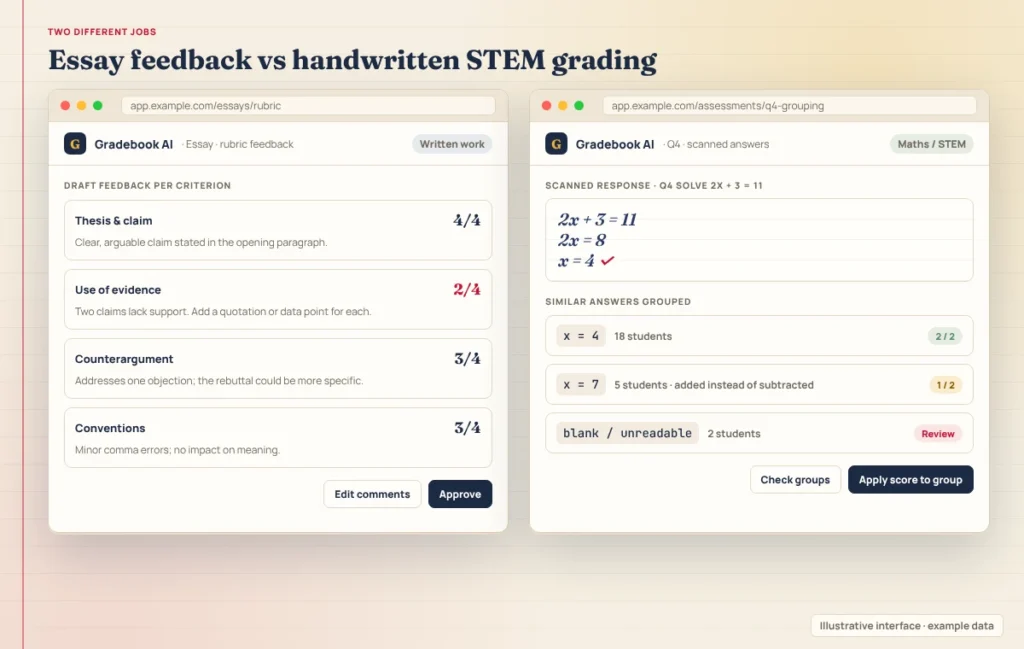
AI Essay Graders vs STEM and Handwritten Grading
AI graders aren’t interchangeable:
- Essays and written responses: CoGrader and EssayGrader focus here, with rubric-based scoring.
- Maths and handwritten work: GradeWithAI explicitly covers maths, including handwritten and scanned work. CoGrader accepts photos of handwriting.
- Exams, problem sets and code: Gradescope is built for this, though its AI grouping needs an institutional licence.
If you teach both writing and STEM subjects, you may need two tools.
Student Privacy: FERPA, COPPA and Training on Student Work
| Tool | FERPA | COPPA | Is student work used to train AI? |
| CoGrader | “FERPA compliance” | Not stated in the pages checked | “We do not use student PII to train our AI models” |
| EssayGrader | “FERPA, COPPA, CCPA compliant” | Vendor claims COPPA compliance | “Student submissions are never used to train AI models” |
| GradeWithAI | “FERPA-aligned” | Not stated in the pages checked | Student work is “never used to train AI models” |
| Gradescope | Help page explains how it addresses FERPA; deletes student records on request | Not stated in the pages checked | Not stated in the pages checked. Its FERPA page says educational records are used to perform and improve the service, which doesn’t establish whether student work is used for AI-model training |
| Brisk | “FERPA & COPPA compliant” | Vendor claims COPPA compliance | Its security FAQ says “user input is not used to train any AI models,” and its student data addendum says its AI service providers “are not permitted to use the Student Data to train their AI models” |
| MagicSchool | “FERPA, COPPA, SOC-2, GDPR … Compliant” | Vendor claims COPPA compliance | Its privacy policy says it does not “use Student Data to train, fine-tune, or improve artificial intelligence or machine learning models” or permit third-party AI providers to do so |
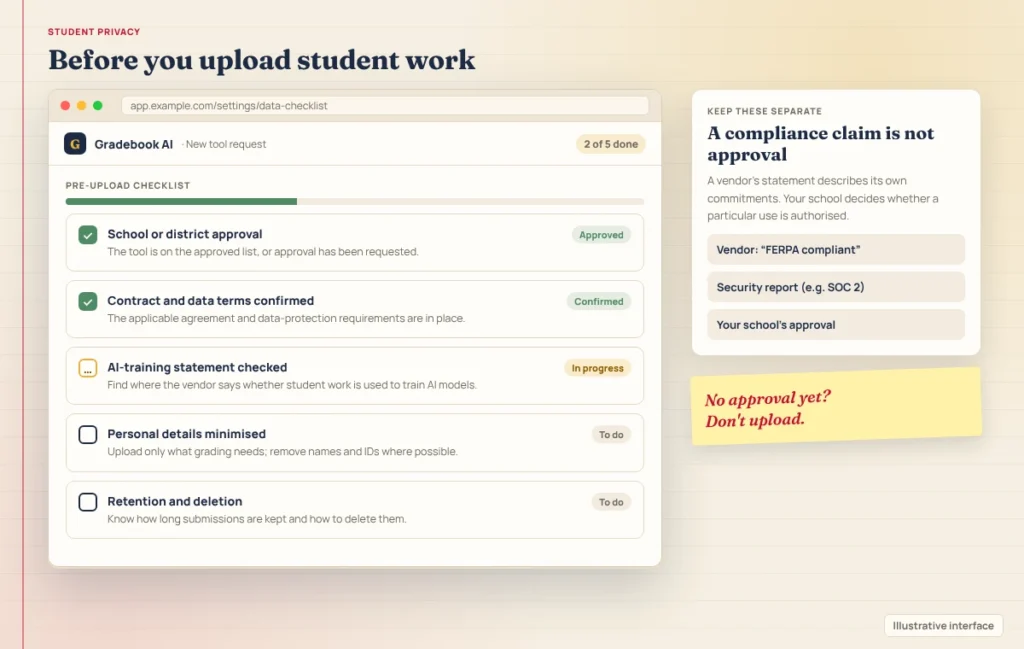
These are the companies’ own commitments, not proof that a particular school’s use meets every legal requirement. Before uploading student work, obtain school or district approval and confirm the applicable contract and data-protection requirements. A vendor’s compliance statement alone does not authorise your use. Security frameworks such as SOC 2 are also separate from privacy laws like FERPA and COPPA, and the wording varies: EssayGrader’s pages cite both “SOC-2 data security practices” and “SOC 2 Type 1 security practices,” and CoGrader cites “SOC2 Type 1.”
Questions worth asking any vendor:
- Is student work used to train AI models, including by third-party AI providers?
- How long is student work stored, and can it be deleted on request?
- What contract or data agreement does our school or district need?
How Accurate Is AI Grading? AI grading can be useful, but the research doesn’t support treating AI scores as interchangeable with a teacher’s. Use these tools as a first pass, then review the result against your rubric and judgment.
A March 2026 paper by researchers at the University of Alberta, titled “LLMs Do Not Grade Essays Like Humans,” tested six large language models from the GPT and Llama families on public essay datasets, without task-specific training. Agreement between the AI and human scores was weak compared with how closely human raters agreed with each other: on the ASAP essay tasks, human raters agreed with each other at a quadratic weighted kappa (QWK) of 0.72, while no model exceeded 0.30. QWK measures how closely two sets of scores agree, not the percentage of essays graded correctly. The models also tended to score short or underdeveloped essays more generously, penalise minor spelling and grammar errors in longer, well-developed essays, and push scores toward the middle of the range. The authors conclude that the models are better suited to supporting teachers than to fully automated grading. A broader research synthesis by Li and colleagues reviewed 65 studies from 2022 to 2025. It found that agreement between AI and human scores “varied substantially both across and within studies,” with reported values spanning a wide range, and concluded that it’s “highly context-dependent.” In other words, some studies found much closer agreement than others; the literature doesn’t show AI grading as uniformly poor or uniformly reliable. So the best tool is the one that matches your subject, workflow and privacy needs, with your review still in the loop.le.
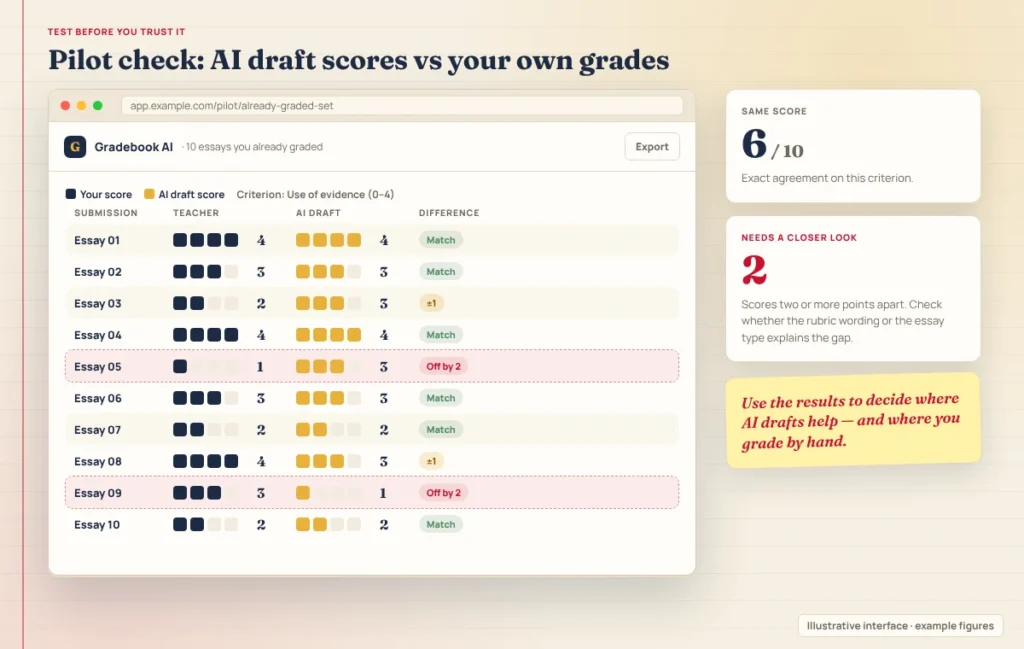
So how accurate is ChatGPT at grading? In this research, it depends heavily on the task, the rubric and the essays. Both papers evaluated specific models under research conditions, not the commercial tools in this guide, and both are published on arXiv; we couldn’t confirm peer-reviewed journal versions. Test any tool on assignments you’ve already graded before relying on it.
Some vendors publish their own scoring-validation figures. CoGrader, for example, reports agreement with official state raters on Texas STAAR responses. These use different datasets, scoring scales, and definitions of agreement, so you can’t use their percentages for a fair head-to-head accuracy ranking.
Are Teachers Allowed to Use AI for Grading?
There’s no single answer, because it depends on your school’s and district’s rules, applicable law, and how you use the tool.
At the federal level in the US, recent Department of Education guidance encourages responsible use rather than banning or specifically approving AI grading. Its July 2025 letter on AI says AI use is allowable under existing federal programs when it meets applicable requirements, and stresses privacy and involving parents. Its August 2026 guidance on education technology emphasises evidence that tools improve student outcomes and requires providers to be transparent about their products’ capabilities and limitations. Neither is a new binding rule.
In practice, check your school or district’s AI policy, keep the final grading decision yourself, and tell students and parents how you use AI in assessment.
How to Choose and Use an AI Grader Responsibly
- Match the tool to the work. Essay graders, STEM graders and feedback tools do different jobs.
- Test it on work you’ve already graded. Compare its scores with yours before using it on live assignments.
- Use your own rubric, and check that the tool applies it the way you intend.
- Review every score and comment before students see them.
- Get approval before uploading. Confirm your school or district has approved the tool, and check the vendor’s data terms.
- Be transparent with students about how you use AI in grading.
For AI tools that help with lesson planning, differentiation and other tasks beyond grading, see our guide to the best AI tools for teachers.
FAQ
What is the best AI for grading work?
It depends on the work. For essays, CoGrader and EssayGrader both offer free plans. For maths and handwritten work, GradeWithAI covers both. For paper exams and problem sets, Gradescope is built for that workflow. For rubric-based feedback, Brisk and MagicSchool are options.
Can ChatGPT grade essays?
It can give feedback and suggest scores if you paste in an essay and a rubric, but research on large language models, including GPT models, found their scores often differed from human graders’. Use it as a starting point, review every score yourself, and check your school’s rules before entering student work.
Is CoGrader free?
Yes. CoGrader’s Starter plan is free for teachers and includes 150 student submissions per month, according to its pricing page. The Individual plan raises that to 350 submissions for $15/month, billed annually.
Do AI graders detect AI-written essays?
Grading and AI detection are different jobs. A grader evaluates work against a rubric, while a detector estimates whether AI wrote the text. Some graders, such as EssayGrader’s paid plans, add AI-writing detection, but detection results are estimates, not proof. Our look at Turnitin’s AI detection explains its limits.
The Bottom Line
The best AI grading tools for teachers fit your subject and keep you in control. Start with a free plan, test it on assignments you’ve already marked, check the vendor’s privacy terms and your school’s policy, and treat every AI score as a draft until you’ve reviewed it.
Sources
Tool details were checked on 27 October 2026 against these official pages:
- CoGrader and CoGrader pricing
- EssayGrader pricing
- GradeWithAI and GradeWithAI pricing
- Gradescope and Is Gradescope FERPA compliant?
- Brisk plans, Brisk FAQ, Brisk security FAQs and Brisk student data privacy addendum
- MagicSchool pricing, MagicSchool writing feedback and MagicSchool privacy policy
- Mathew et al., “LLMs Do Not Grade Essays Like Humans” (arXiv, 2026)
- Li et al., “Agreement Between Large Language Models and Human Raters in Essay Scoring” (arXiv)
- US Department of Education AI guidance (July 2025)
- US Department of Education guidance on responsible use of education technology (August 2026)
Keep Exploring