


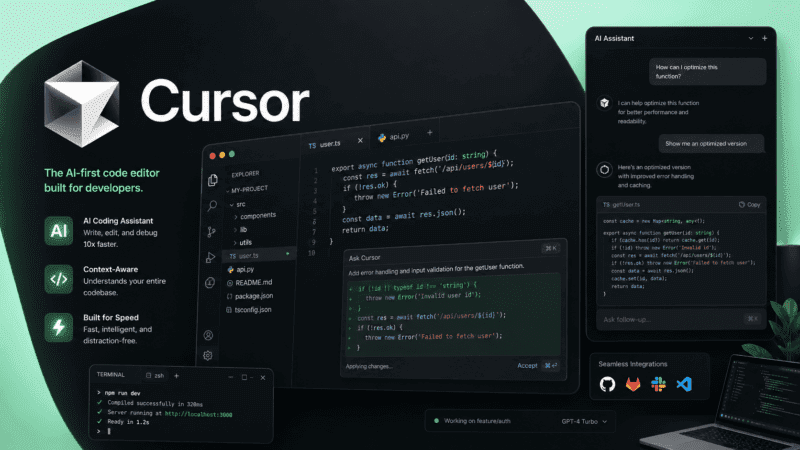
Cursor took the familiar VS Code interface and rebuilt the AI layer underneath it, and the bet paid off: over a million paying developers and a business reportedly crossing $2 billion in annualized revenue by early 2026. The credit-based pricing that arrived alongside that growth has been the more controversial part of the story.
What is Cursor?
Cursor is an AI-native code editor built on a VS Code fork, giving developers access to frontier AI models from OpenAI, Anthropic, and Google directly inside their coding workflow. Beyond autocomplete, Cursor understands full codebase context, letting it make coordinated multi-file edits rather than suggestions limited to a single open file.
The bigger shift in 2026 has been toward autonomous coding agents: background processes that can plan, write, test, and open pull requests with less step-by-step supervision, now extended to mobile through a dedicated iOS app for monitoring and directing agents remotely.
Key features
Codebase-Aware Chat
Understands a project's full file structure and history, allowing Cursor to answer questions and make edits with awareness of code elsewhere in the project, not just the currently open file.
Multi-File Agent Editing
Can plan and execute changes across multiple files in a single request, useful for refactors or features that touch several parts of a codebase at once.
Composer (Cursor's Own Model)
Cursor's proprietary agentic model, built to balance frontier-level intelligence with speed and token efficiency for everyday coding tasks.
Frontier Model Access
Lets developers switch between models like Claude, GPT, and Gemini within the same project, choosing the right model for a given task's complexity.
Cursor for iOS
A companion mobile app for launching cloud-based coding agents, monitoring progress, reviewing diffs, and merging pull requests remotely.
Tab Completion
Context-aware inline code completion that predicts multi-line edits, not just single-token suggestions, based on recent changes across the project.
Pros
- Deep codebase context enables genuinely useful multi-file edits, not just single-line suggestions
- Frontier model flexibility lets developers pick the right model for a given task
- Composer offers a fast, token-efficient option for routine coding work
- Cursor for iOS extends agent monitoring beyond the desk for async workflows
- Strong adoption among engineering teams at well-known companies
Cons
- The 2025 shift to credit-based billing effectively reduced usable requests at the same price point for many users
- Power users on Pro commonly report effective monthly costs of $40 to $50 after overages
- Bugbot, Cursor's AI code review add-on, costs an additional $40/user/month on top of the Teams plan
- Cursor for iOS remains iOS-only in its first release, with no Android version yet announced
Pricing
Cursor's Hobby plan is free and includes limited Agent requests and Tab completions, enough to evaluate the editor on a real project. Pro costs $20/month and includes unlimited Tab completions plus a credit pool roughly equal to $20 of frontier model usage; Auto mode remains unlimited on all paid plans regardless of credits. Pro+ costs $60/month and Ultra costs $200/month, offering roughly 20x the usage ceiling of Pro for heavy agent-driven workflows. Teams cost $40/user/month with centralized billing and admin controls, and Enterprise pricing is custom.
Credits deplete only when manually selecting a frontier model rather than using Auto mode, which is unlimited across every paid tier. Since actual usage costs can escalate with heavy agent use, particularly on large codebases, confirm current credit consumption rates on Cursor's pricing page before choosing a tier for a team.
Best for
Cursor is best suited to developers and engineering teams who want deep AI integration directly inside their code editor, particularly for multi-file work and autonomous agent-driven tasks, rather than a simple autocomplete plugin. It fits naturally within broader AI Coding tools for teams building software with heavy day-to-day AI assistance.
Use cases
- Refactoring and editing across multiple files in a single request
- Running autonomous coding agents for background feature development
- Asking codebase-aware questions during onboarding or debugging
- Reviewing and merging pull requests generated by AI agents
- Monitoring and directing coding agents remotely via mobile
- Switching between frontier AI models based on task complexity
Supported platforms
- Windows, macOS, and Linux for the core desktop editor, with an iOS companion app in public beta for monitoring and directing coding agents remotely. An Android app has been discussed but is not yet released.
Languages
- Cursor's interface and documentation are primarily in English, consistent with most developer-focused coding tools.
Integrations
- GitHub for repository access and pull requests, Slack and Linear for workflow context, Datadog for log querying through MCP, and broader Model Context Protocol server support for connecting external tools and data sources.
Things to consider
- The shift to credit-based billing in 2025 remains a significant point of friction in the developer community, and actual monthly cost can diverge meaningfully from the advertised plan price for heavy agent users. Teams evaluating Cursor for code review should also budget separately for Bugbot, which is priced as an add-on rather than included in the core Teams plan.
- Cursor for iOS is explicitly designed for monitoring and directing agents rather than writing code directly on a phone, so it functions as a companion to the desktop experience rather than a replacement for it.
How the tool compares
Compared with GitHub Copilot, Cursor offers deeper codebase-wide context and multi-file agent editing, at a higher price point that reflects the added capability. Compared with Claude AI accessed directly through Claude Code, Cursor provides a full graphical editor experience with model flexibility across multiple providers, while Claude Code offers a more terminal-native workflow tightly integrated with Anthropic's own models.
AIToolister verdict
Cursor remains one of the most capable AI-native code editors available, particularly for teams doing heavy multi-file work and autonomous agent-driven development. The credit-based pricing requires more active usage monitoring than the older flat-rate model, so it's worth testing actual usage patterns on the free Hobby tier before committing to Pro or higher.
For developers who want the flexibility to switch between frontier models within one editor and increasingly manage agents from their phone, Cursor's feature set is hard to match, provided the credit economics work out for the team's actual usage volume.
Frequently asked questions
- Is Cursor free to use?
Yes. Cursor's Hobby plan is free and includes limited Agent requests and Tab completions, enough to evaluate the editor before deciding whether to upgrade.
- How does Cursor's credit system work?
Paid plans include a credit pool that depletes only when manually selecting a frontier model like Claude or GPT. Auto mode, which lets Cursor choose the model automatically, remains unlimited on every paid plan.
- Does Cursor have a mobile app?
Yes, but it's iOS-only in its first release. Cursor for iOS lets developers launch cloud-based coding agents and monitor or direct agents running on their desktop, rather than writing code directly on the phone. No Android version has been released yet.
- What is Cursor's Composer model?
Composer is Cursor's own proprietary agentic model, designed to deliver strong coding performance while optimizing for speed and token efficiency compared to some third-party frontier models.
- Is Bugbot included in Cursor's Teams plan?
No. Bugbot, Cursor's AI-powered code review tool, is priced as a separate add-on at $40 per user per month on top of the base Teams plan cost.